<?xml version="1.0" encoding="utf-8"?><feed xmlns="http://www.w3.org/2005/Atom" xml:lang="en"><generator uri="https://jekyllrb.com/" version="4.4.1">Jekyll</generator><link href="/feed.xml" rel="self" type="application/atom+xml" /><link href="/" rel="alternate" type="text/html" hreflang="en" /><updated>2026-02-28T18:20:21+01:00</updated><id>/feed.xml</id><title type="html">MOFFTECH INDUSTRIES</title><subtitle>A new void.</subtitle><entry><title type="html">HackRF and ADS-B and COVID-19 in pictures</title><link href="/hackrf/ads-b/2020/05/17/ADS-B.html" rel="alternate" type="text/html" title="HackRF and ADS-B and COVID-19 in pictures" /><published>2020-05-17T01:00:00+02:00</published><updated>2020-05-17T01:00:00+02:00</updated><id>/hackrf/ads-b/2020/05/17/ADS-B</id><content type="html" xml:base="/hackrf/ads-b/2020/05/17/ADS-B.html"><![CDATA[<h3 id="hackrf-and-ads-b-and-covid-19-in-pictures">HackRF and ADS-B and COVID-19 in pictures</h3>

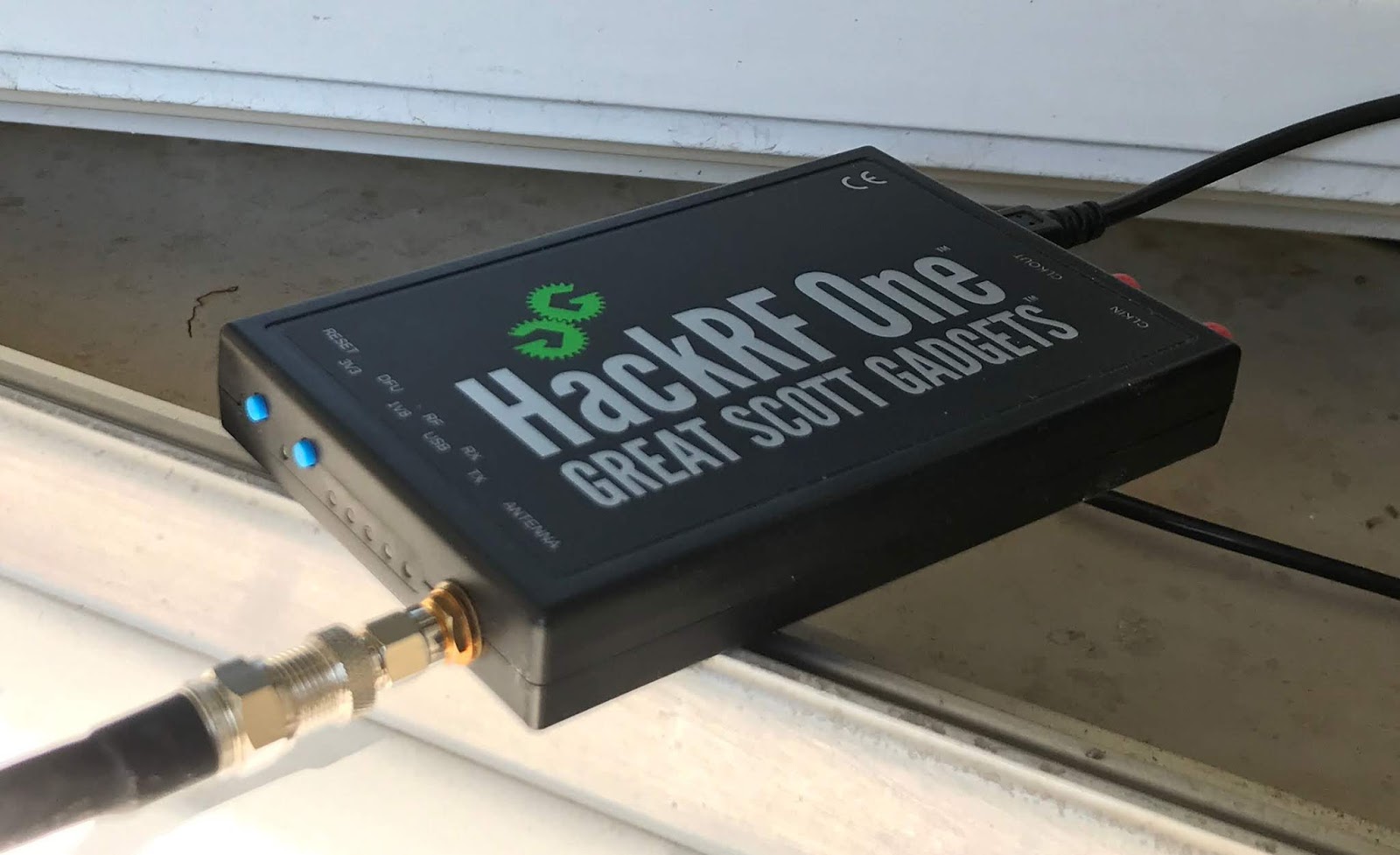
<p>Given the current COVID-19 situation, I thought I'd take a look at what else was in the air. With not much to do these days, it was a good reason to pull out my ADS-B aerial and see about getting my HackRF One device to play with VirtualRadar.
<img src="/assets/post_imgs/2020-05-17-ADS-B/01.jpg" alt="HackRF One Device" />
Some pictures from VirtualRadar are in the second half of this post, the first half talks about setting things up.</p>
<p>In my <a href="https://www.moff.tech/2016/10/software-defined-radio-and-ads-b-with.html">blog post from 2016</a> I described my experience getting ADS-B going with an rtl device. If you're reading this, you probably already know what ADS-B is, but if you want a refresher then check out my earlier post.</p>

<h3 id="setting-things-up">Setting Things Up</h3>

<p>HackRF isn't supported by the dump1090 or the rlt_adsb applications for Linux, so I spent quite a bit of time trying to work out how to get some "1090" software to work with VirtualRadar. I tried gr-air-modes but it was a total disaster trying to "make" even under Debian 10 (Buster) due to a pyqt4 dependency and I almost gave up the whole idea.</p>

<p>In the end I found a <a href="https://github.com/antirez/dump1090">fork</a> of dump1090 that installed and worked with little drama. The configuration of VirtualRadar is slightly different from that in my rtl post.</p>

<p>Here's the dump1090 fork install steps - it wasn't quite as straightforward as the doc suggested.</p>

<p>This bit went fine:</p>

<div class="language-bash highlighter-rouge"><div class="highlight"><pre class="highlight"><code><span class="nv">$ </span><span class="nb">sudo </span>apt-get <span class="nb">install </span>librtlsdr0 librtlsdr-dev libhackrf-dev libairspy-dev libsoxr-dev  
<span class="nv">$ </span><span class="nb">chmod </span>755 Downloads/SDRplay_RSP_API-Linux-2.13.1.run  
<span class="nv">$ </span>./Downloads/SDRplay_RSP_API-Linux-2.13.1.run  
<span class="nv">$ </span><span class="nb">sudo </span>ldconfig  
<span class="nv">$ </span><span class="nb">cd </span>personal/git/  
<span class="nv">$ </span>git clone https://github.com/itemir/dump1090_sdrplus.git
</code></pre></div></div>

<p>This bit did not go so fine:</p>

<div class="language-bash highlighter-rouge"><div class="highlight"><pre class="highlight"><code><span class="nv">$ </span><span class="nb">cd </span>dump1090_sdrplus/  
<span class="nv">$ </span>make  
.../usr/bin/ld: dump1090.o: <span class="k">in function</span> <span class="sb">`</span>readerThreadEntryPoint<span class="s1">':  
home/xxx/personal/git/dump1090_sdrplus/dump1090.c:852: undefined reference to `rtlsdr_read_async'</span>  
usr/bin/ld: dump1090.o: <span class="k">in function</span> <span class="sb">`</span>main<span class="s1">':  
home/xxx/personal/git/dump1090_sdrplus/dump1090.c:3172: undefined reference to `rtlsdr_close'</span>  
collect2: error: ld returned 1 <span class="nb">exit </span>status  
make: <span class="se">\*\*\*</span> <span class="se">\[</span>Makefile:12: dump1090<span class="se">\]</span> Fehler 1  
</code></pre></div></div>
<p>(Fehler is German for “failure”)</p>

<p>This turns out to be a known issue requiring (on Debian) an edit of /usr/lib/x86_64-linux-gnu/pkgconfig/librtlsdr.pc :</p>

<div class="language-bash highlighter-rouge"><div class="highlight"><pre class="highlight"><code><span class="nv">prefix</span><span class="o">=</span>/usr  
<span class="nv">exec_prefix</span><span class="o">=</span><span class="se">\$</span><span class="o">{</span>prefix<span class="o">}</span>  
<span class="nv">libdir</span><span class="o">=</span><span class="se">\$</span><span class="o">{</span>exec_prefix<span class="o">}</span>/lib  
<span class="nv">includedir</span><span class="o">=</span><span class="se">\$</span><span class="o">{</span>prefix<span class="o">}</span>/include  
</code></pre></div></div>

<p>Then I could build:</p>

<div class="language-bash highlighter-rouge"><div class="highlight"><pre class="highlight"><code><span class="nv">$ </span>make  
cc <span class="nt">-g</span> <span class="nt">-o</span> dump1090 dump1090.o anet.o  <span class="nt">-lrtlsdr</span> <span class="nt">-lhackrf</span> <span class="nt">-lairspy</span> <span class="nt">-lsoxr</span> <span class="nt">-lpthread</span> <span class="nt">-lm</span> <span class="nt">-lmirsdrapi-rsp</span>  
</code></pre></div></div>

<p>Starting dump1090, it first looked for rtlsdr and then for a HackRF:</p>

<div class="language-bash highlighter-rouge"><div class="highlight"><pre class="highlight"><code><span class="nv">$ </span>./dump1090  
No supported RTLSDR devices found.  
Unable to initialize RSP  
HackRF successfully initialized <span class="o">(</span>AMP Enable: 0, LNA Gain: 32, VGA Gain: 48<span class="o">)</span><span class="nb">.</span>  
</code></pre></div></div>

<p>Interactive mode fairly quickly showed promising results:</p>

<div class="language-bash highlighter-rouge"><div class="highlight"><pre class="highlight"><code><span class="nv">$ </span>./dump1090 <span class="nt">--interactive</span>  

...  
  
Hex    Flight   Altitude  Speed   Lat       Lon       Track  Messages Seen  <span class="nb">.</span>  
<span class="nt">--------------------------------------------------------------------------------</span>  
3e6bd1 DKGAJ    3900      0       0.000     0.000     0     8         0 sec  
</code></pre></div></div>

<p>Here I tell the application that I have a HackRF and that I want it to stream the results over the network, binding to port 8081 instead of the default 8080 for the web display because VirtualRadar will fail to start when it also tries to bind to port 8080.</p>

<div class="language-bash highlighter-rouge"><div class="highlight"><pre class="highlight"><code><span class="nv">$ </span>./dump1090 <span class="nt">--dev-hackrf</span> <span class="nt">--net</span> <span class="nt">--net-http-port</span> 8081  
HackRF successfully initialized <span class="o">(</span>AMP Enable: 0, LNA Gain: 32, VGA Gain: 48<span class="o">)</span><span class="nb">.</span>  
<span class="k">*</span>8d471f59ea3e9858011c08f4aa9d<span class="p">;</span>  
CRC: f4aa9d <span class="o">(</span>ok<span class="o">)</span>  
Single bit error fixed, bit 82  
DF 17: ADS-B message.  
  Capability     : 5 <span class="o">(</span>Level 2+3+4 <span class="o">(</span>DF0,4,5,11,20,21,24,code7 - is on airborne<span class="o">))</span>  
  ICAO Address   : 471f59  
  Extended Squitter  Type: 29  
  Extended Squitter  Sub : 2  
  Extended Squitter  Name: Unknown  
    Unrecognized ME <span class="nb">type</span>: 29 subtype: 2  
</code></pre></div></div>

<p>This dump1090 version seems to have VirtualRadar directly in mind because the default ports it uses to stream data was what VirtualRadar expects by default.</p>

<div class="language-bash highlighter-rouge"><div class="highlight"><pre class="highlight"><code><span class="nv">$ </span>netstat <span class="nt">-pano</span> <span class="se">\|</span> <span class="nb">grep </span>dump  
tcp        0      0 0.0.0.0:<span class="k">**</span>8081<span class="k">**</span>            0.0.0.0:<span class="se">\*</span>               LISTEN      17413/./dump1090     aus <span class="o">(</span>0.00/0/0<span class="o">)</span>  
tcp        0      0 0.0.0.0:<span class="k">**</span>30001<span class="k">**</span>           0.0.0.0:<span class="se">\*</span>               LISTEN      17413/./dump1090     aus <span class="o">(</span>0.00/0/0<span class="o">)</span>  
tcp        0      0 0.0.0.0:<span class="k">**</span>30002<span class="k">**</span>           0.0.0.0:<span class="se">\*</span>               LISTEN      17413/./dump1090     aus <span class="o">(</span>0.00/0/0<span class="o">)</span>  
tcp        0      0 0.0.0.0:<span class="k">**</span>30003<span class="k">**</span>           0.0.0.0:<span class="se">\*</span>               LISTEN      17413/./dump1090     aus <span class="o">(</span>0.00/0/0<span class="o">)</span>  
</code></pre></div></div>

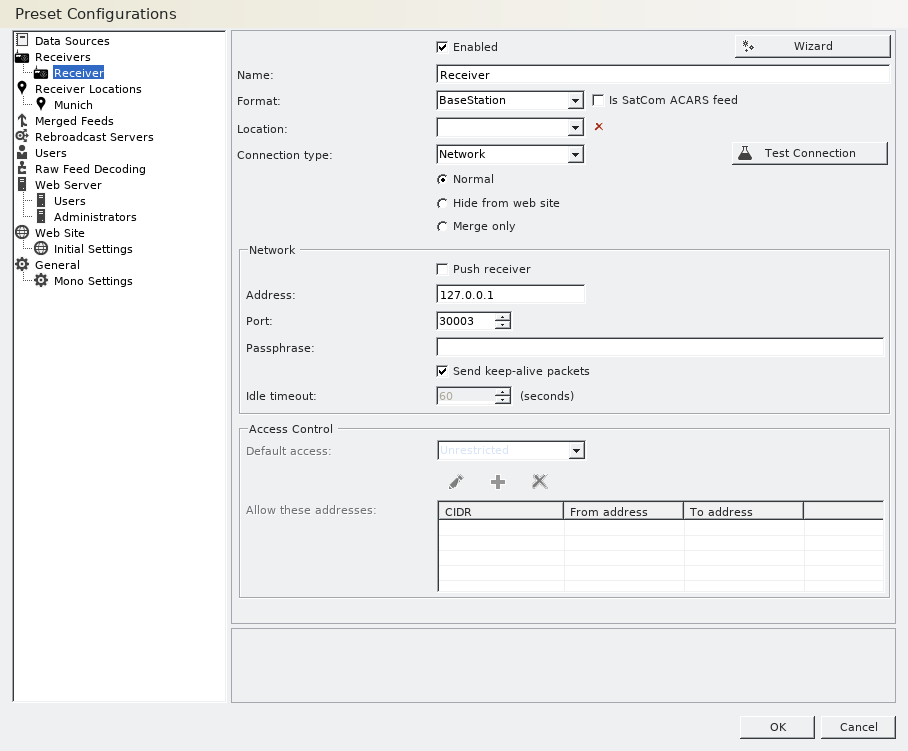
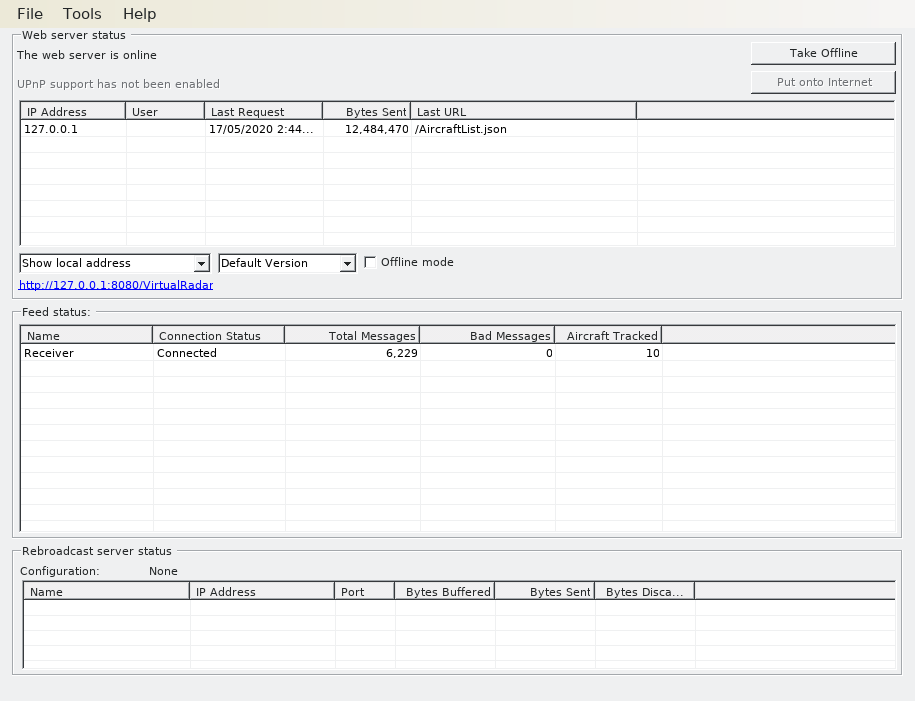
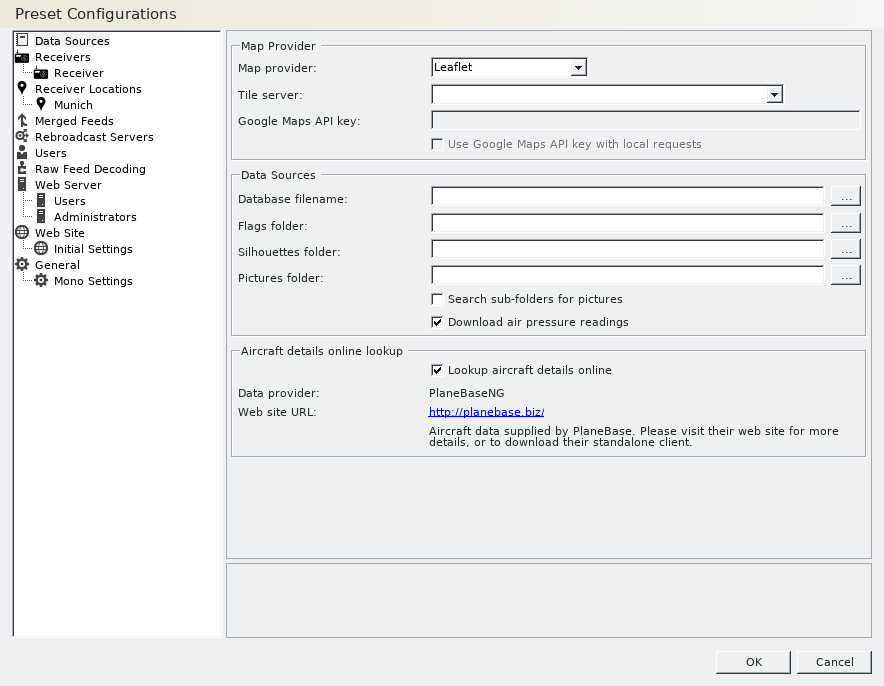
<p>VirtualRadar is configured according to the following screenshot, most of this is defaults:</p>

<p><img src="/assets/post_imgs/2020-05-17-ADS-B/02.png" alt="Virtual Radar Settings Screenshot 1" /></p>

<p><img src="/assets/post_imgs/2020-05-17-ADS-B/03.png" alt="Virtual Radar Settings Screenshot 2" /></p>

<p>Note that if you use google as the map provider then you need to setup API access and you probably don't want to do that, so use Leaflet.</p>

<p>And we're away.</p>

<p><img src="/assets/post_imgs/2020-05-17-ADS-B/04.png" alt="Virtual Radar screenshot showing receiver connected" /></p>

<h3 id="there-must-be-something-in-the-air">There Must Be Something in the Air</h3>

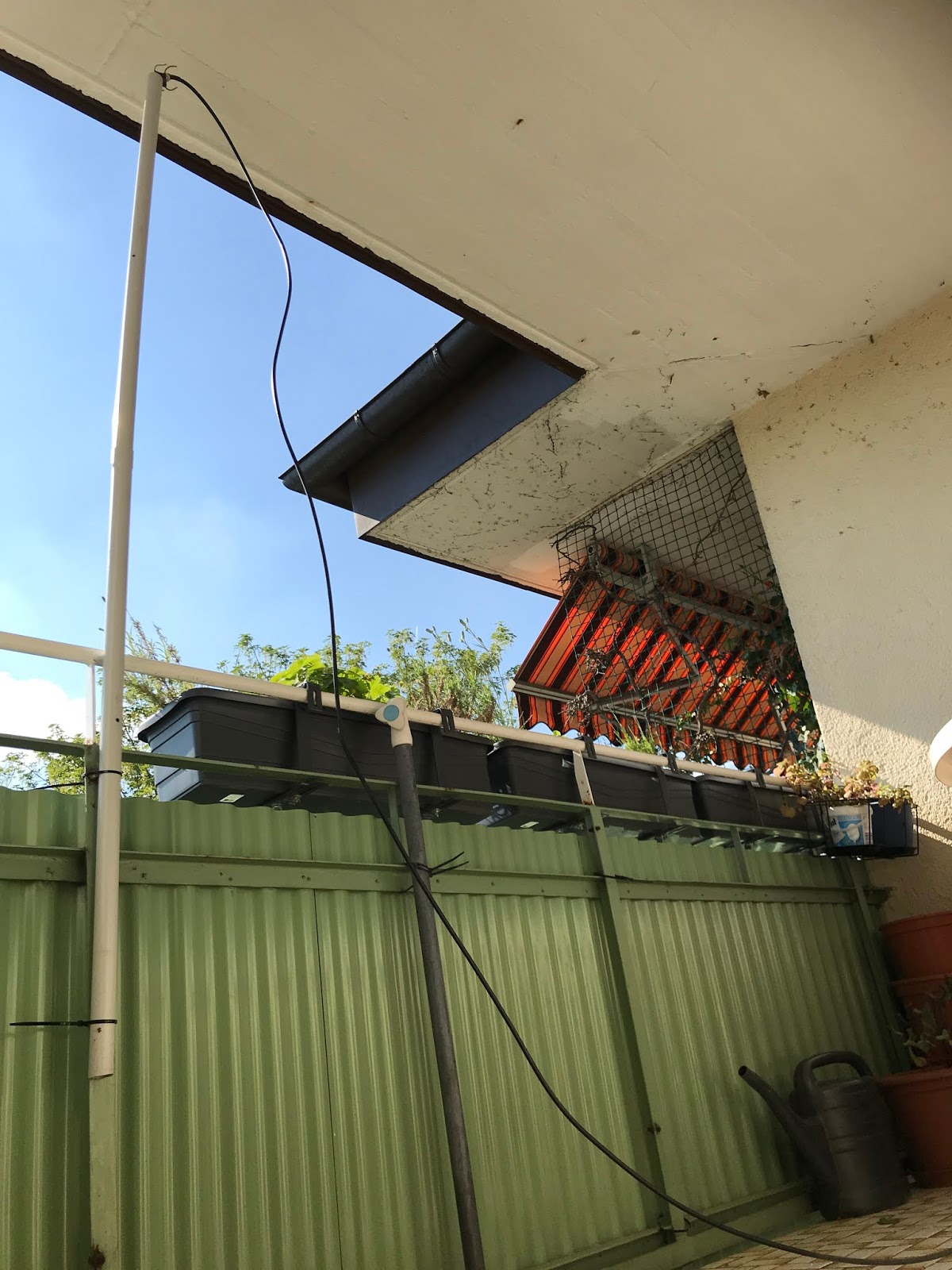
<p>Over a few hours I did see activity but the sky wasn't exactly alive wih commercial traffic. I should also add that I face west and it's quite possible that my position captures very little of the Munich airport traffic.</p>

<p><img src="/assets/post_imgs/2020-05-17-ADS-B/05.jpg" alt="Photo of balcony North-West direction with antenna" /></p>

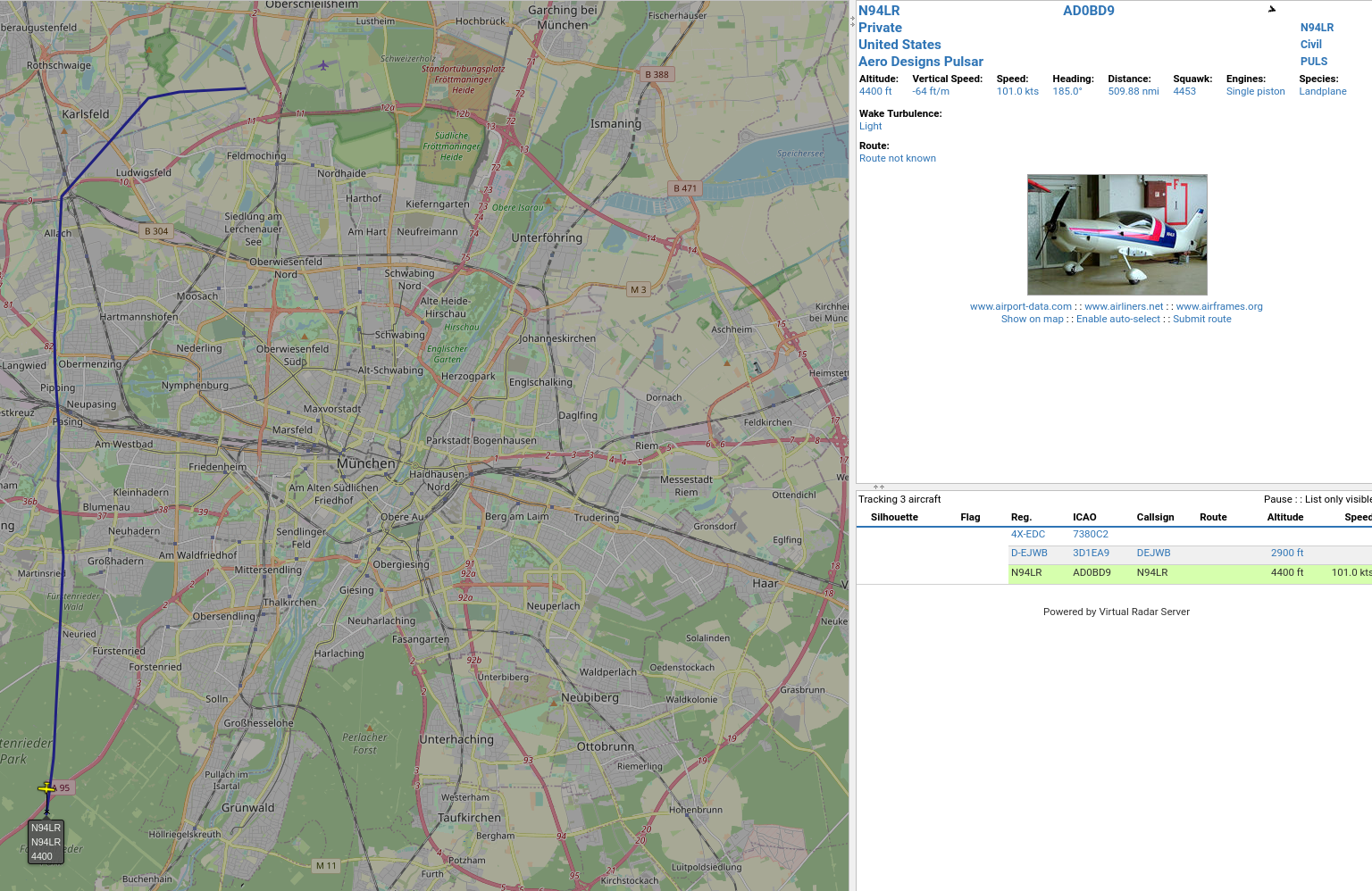
<p>Overwhelmingly most of the planes I saw today were private. Obviously registered around near where I live (Munich, Germany) with the curious exception of this fellow out of the US:</p>

<p><img src="/assets/post_imgs/2020-05-17-ADS-B/06.png" alt="Virtual Radar screenshot showing US origin propeller plane on map" /></p>

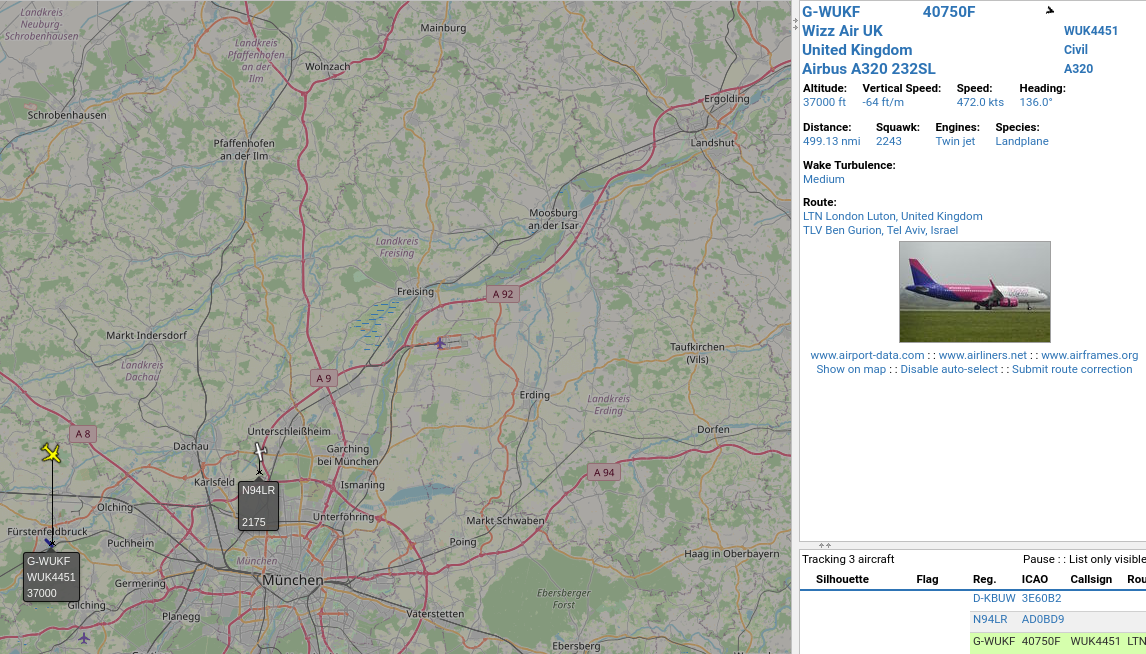
<p>Tel-Aviv</p>

<p><img src="/assets/post_imgs/2020-05-17-ADS-B/07.png" alt="Virtual Radar screenshot showing Tel-Aviv origin plane on map" /></p>

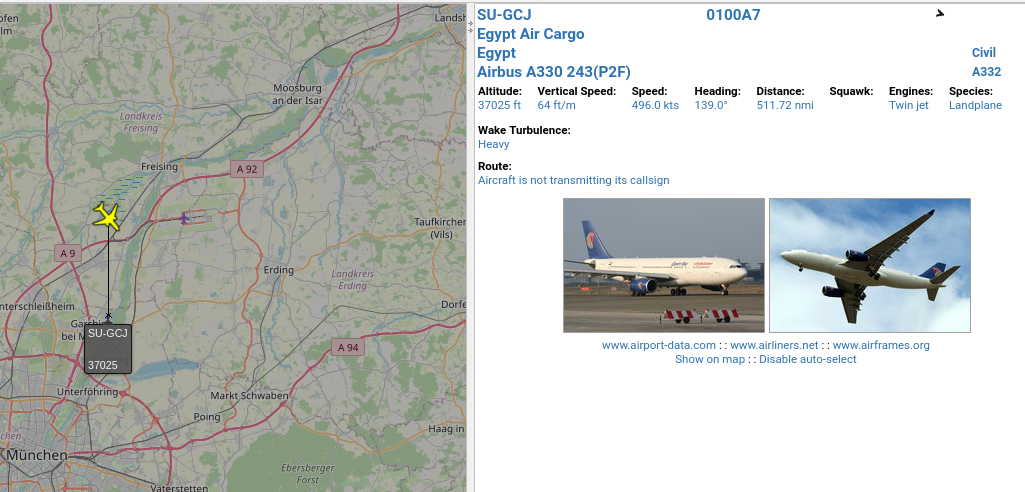
<p>It's hard to say how many airlines were running cargo, but this Egyptian one obviously was:</p>

<p><img src="/assets/post_imgs/2020-05-17-ADS-B/08.png" alt="Virtual Radar screenshot showing Egypt Air Cargo plane on map" /></p>

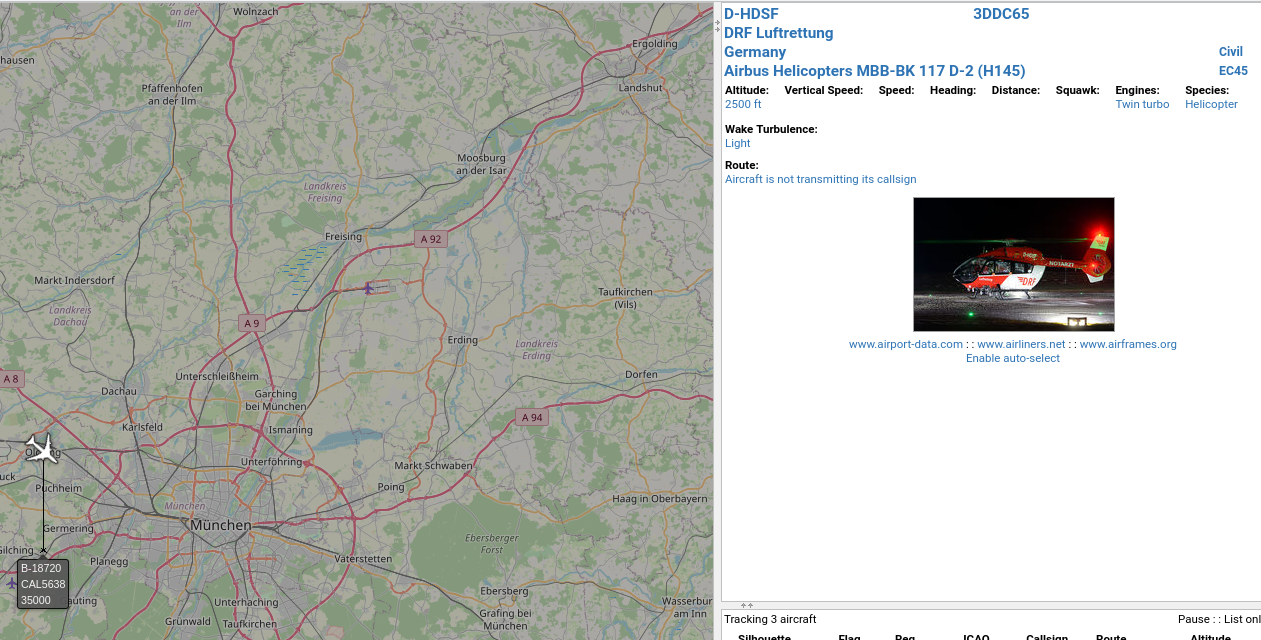
<p>Someone in Munich was having a bad day, here's a rescue helicopter:</p>

<p><img src="/assets/post_imgs/2020-05-17-ADS-B/09.png" alt="Virtual Radar screenshot showing DRF Luftrettung helicopter on map" /></p>

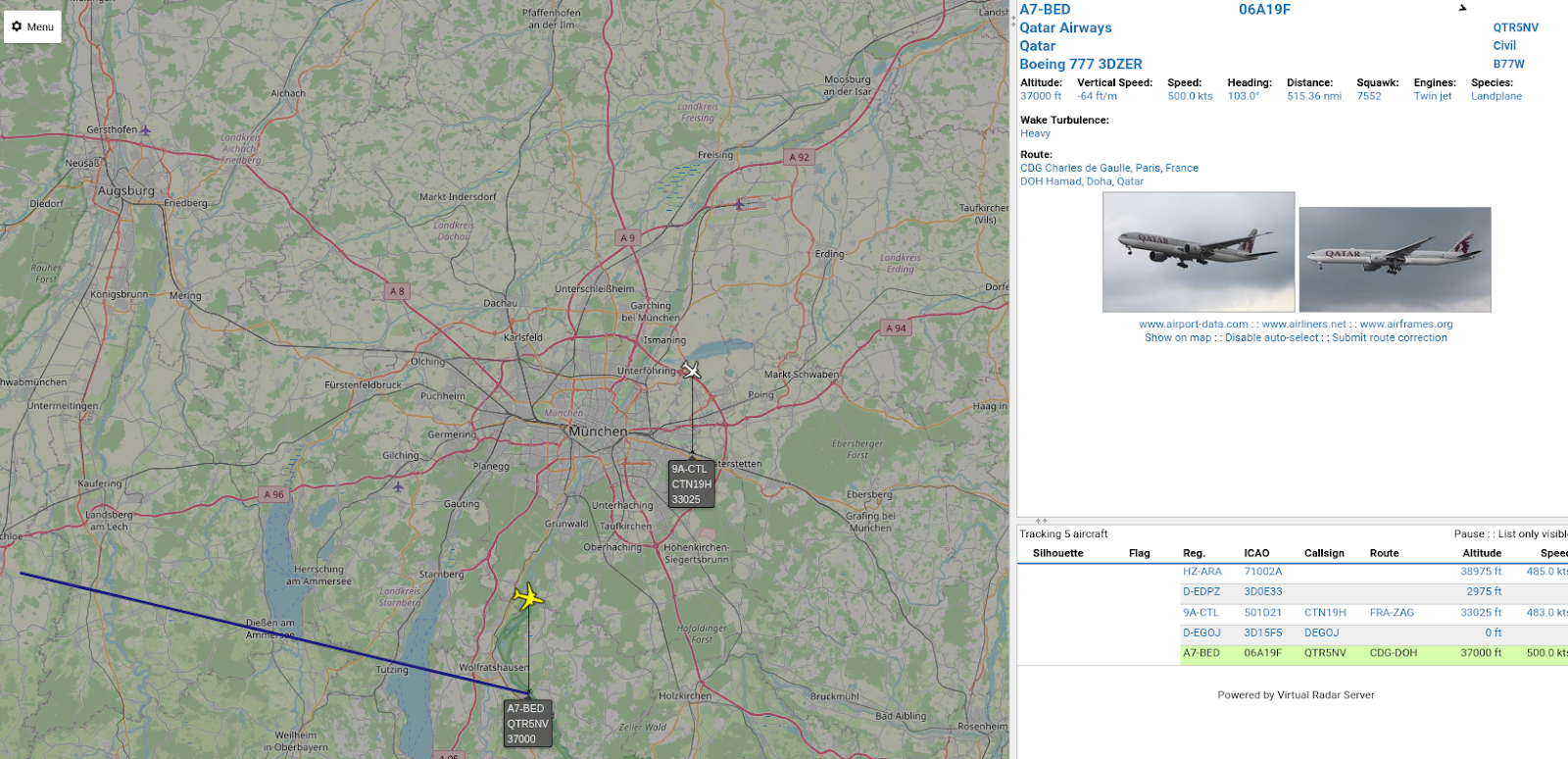
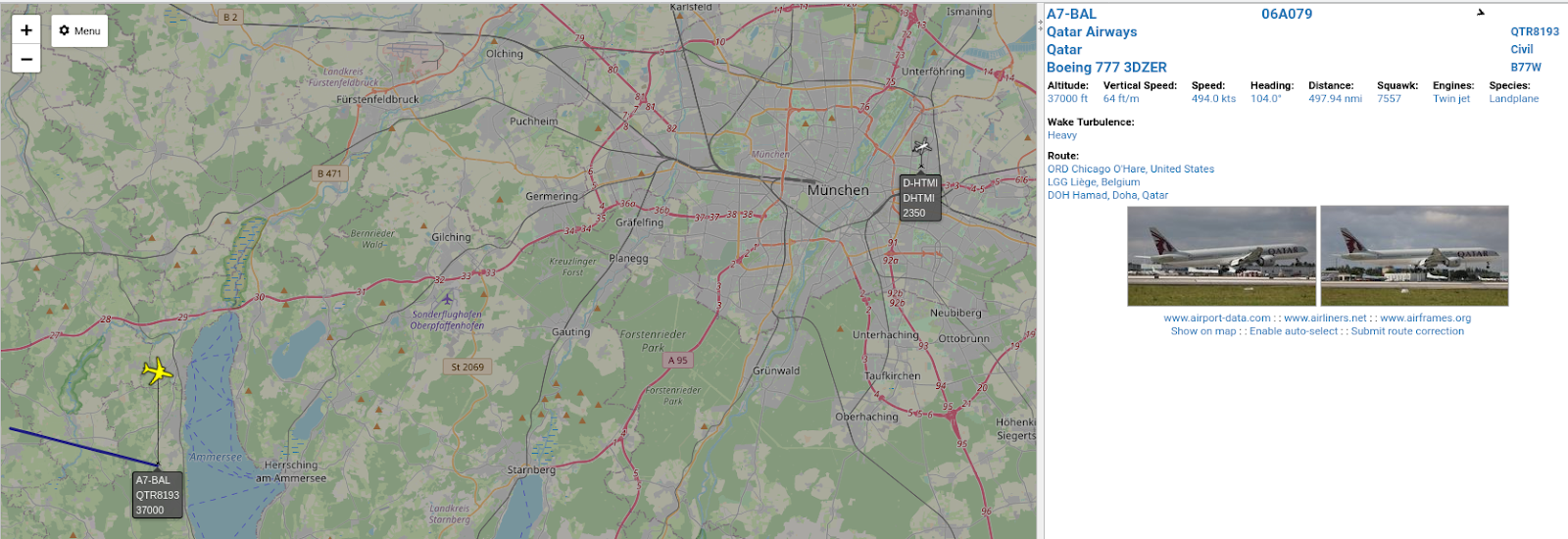
<p>Qatar</p>

<p><img src="/assets/post_imgs/2020-05-17-ADS-B/10.png" alt="Virtual Radar screenshot showing Qatar Airways plane on map" /></p>

<p><img src="/assets/post_imgs/2020-05-17-ADS-B/11.png" alt="Virtual Radar screenshot showing second Qatar Airways plane on map" /></p>

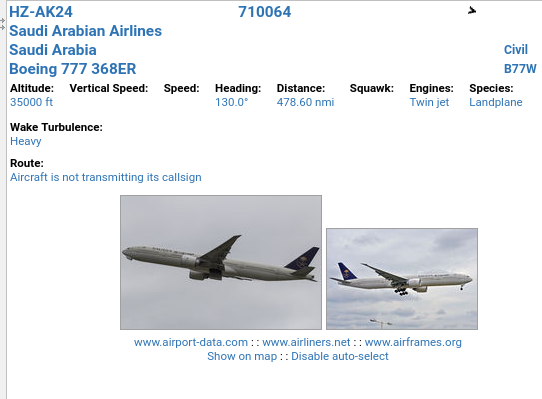
<p>Saudi</p>

<p><img src="/assets/post_imgs/2020-05-17-ADS-B/12.png" alt="Virtual Radar screenshot showing only Saudi Arabian Airlines plane" /></p>

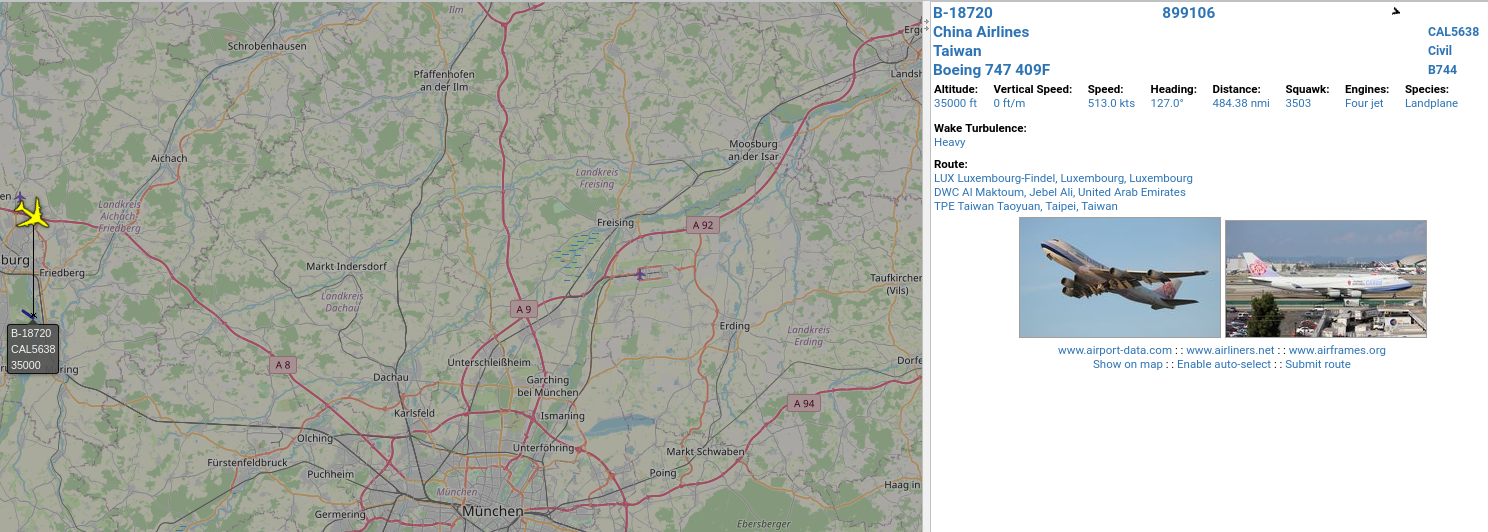
<p>China</p>

<p><img src="/assets/post_imgs/2020-05-17-ADS-B/13.png" alt="Virtual Radar screenshot showing China Airlines plane on map" /></p>

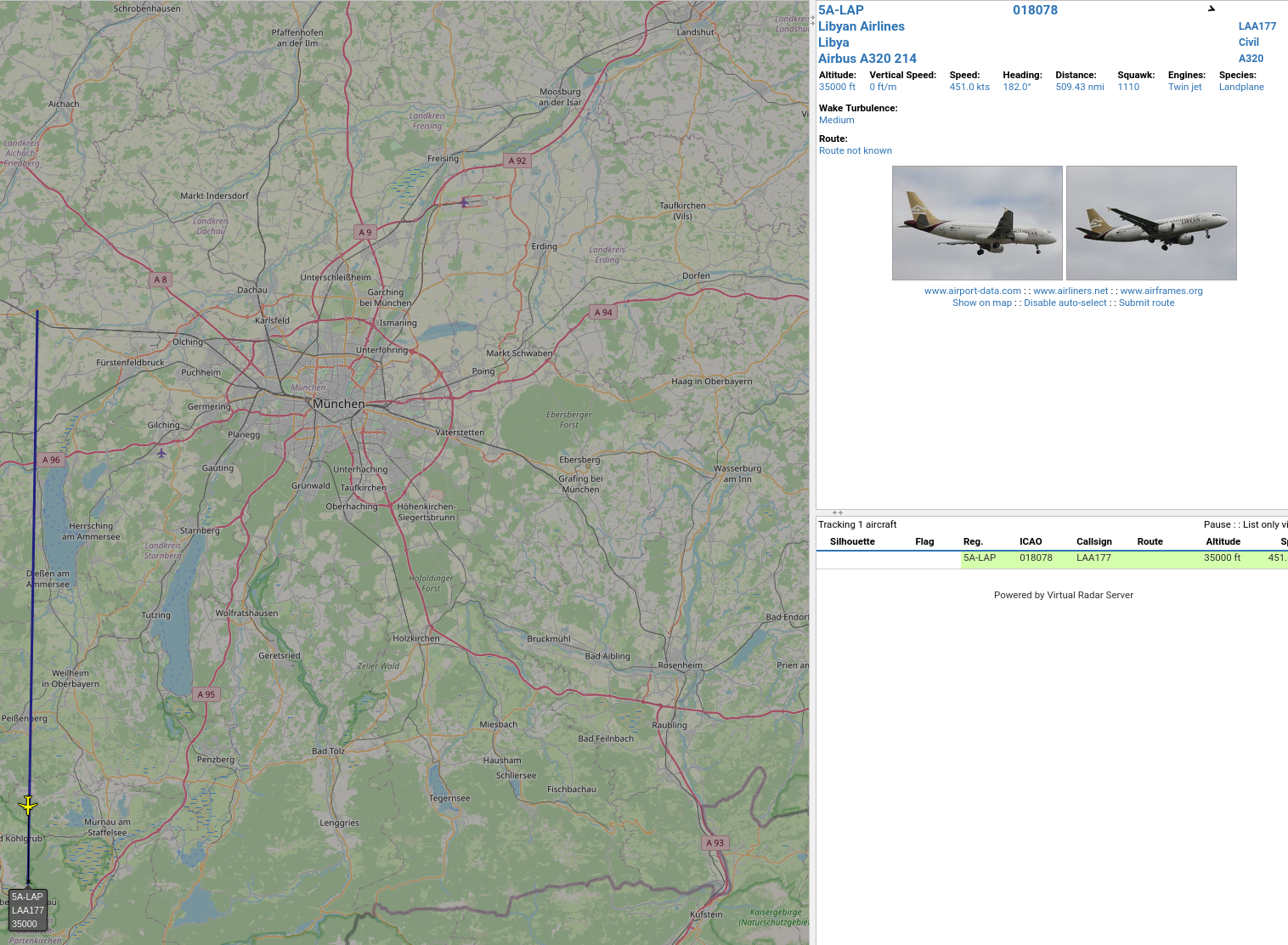
<p>Libya - Not sure if the flight path is accurately recorded:</p>

<p><img src="/assets/post_imgs/2020-05-17-ADS-B/14.png" alt="Virtual Radar screenshot showing Libyan Airlines plane on map heading directly south" /></p>]]></content><author><name></name></author><category term="HackRF" /><category term="ADS-B" /><summary type="html"><![CDATA[HackRF and ADS-B and COVID-19 in pictures]]></summary></entry><entry><title type="html">Making a Mailserver - Spam Blocking, Revisited</title><link href="/email/exim4/spam/2018/12/30/antipam.html" rel="alternate" type="text/html" title="Making a Mailserver - Spam Blocking, Revisited" /><published>2018-12-30T00:00:00+01:00</published><updated>2018-12-30T00:00:00+01:00</updated><id>/email/exim4/spam/2018/12/30/antipam</id><content type="html" xml:base="/email/exim4/spam/2018/12/30/antipam.html"><![CDATA[<p>In an earlier post I described implementing spamassassin with exim4. The
information there still holds true, but the technique of simply
implementing "spamd" has not been enough to hold back spammers who
have my email address. My email address was harvested in both the
LinkedIn and Last.fm hacks. In the last years the targeted spam has
increased noticeably.</p>

<p>I started to train my desktop email client to pick out spam and it does
a decent job, so I weathered the deluge for some time. However, plenty
of spam still gets through and when my desktop email client is not open
I have plenty of junk to pick through on my mobile devices.</p>

<p>Finally, I've taken the time to sharpen up my exim4 defenses.</p>

<h3 id="challenges">Challenges</h3>

<p>In the rest of this post, I'll be answering these questions:</p>

<ol>
  <li>Does spamassassin support Domain Name System Blacklists
(<a href="https://www.dnsbl.info/">DNSBL</a>)?</li>
  <li>How do I integrate blocklist (DNSBL) checks in exim4?</li>
  <li>How do I block hosts that are not really mailservers?</li>
  <li>How do I block on reverse DNS failures?</li>
  <li>How do I allow specific hosts to skip checking by exim4 and spamd?</li>
  <li>How do I verify these measures are working properly?</li>
</ol>

<p>The answers to these questions are straightforward, but took quite a bit
of research time and verification. Point 6 isn't separately addressed;
each section that follows will talk about the ways that I verified the
spam mitigations were working.</p>

<h3 id="spamassassin-and-exim4">spamassassin and exim4</h3>
<p>It turns out that spamassassin (spamd) supports
<a href="https://www.dnsbl.info/">DNSBL</a> by
<a href="https://wiki.apache.org/spamassassin/DnsBlocklists">default</a>. I
actually discovered this after going through the process of integrating
zen.spamhaus.org checking in exim4. The difference is that you can kill
spam outright with exim4 integration, but spamd will use it as part of
the point calculation when determining how 'spammy' an email is.</p>

<p>There's a downside then to spamd: while the blocklist from spamhaus has
a very high accuracy, being on the blocklist doesn't guarantee that
spamd will calculate enough points to junk the email.</p>

<p>It's possible to change the <a href="https://wiki.apache.org/spamassassin/DnsBlocklists">point
value</a> of addresses
that are on DNSBLs by adding a "score URIBL_BLACK &lt;value&gt;" line to
the spamassassin config file. You also need to ensure that perl's
Net::DNS is installed. To check if that is installed, try "perl
-MNet::DNS -e 1" and the command should execute with no errors.</p>

<p>One unanswered question I have is whether the perl module takes care of
the DNS lookup and server to use, or whether your server needs to have a
a spamhaus friendly DNS server in <em>/etc/resolv.conf</em> - see the
spamassassin DNSBL discussion below.</p>

<h4 id="verify-spamassassin-is-using-dnsbl">Verify spamassassin is using DNSBL</h4>
<p>To verify whether DNSBL is being used by spamassassin, check the log for
the presence of URIBL_BLACK. This could be the syslog logfile depending
on the system, not the exim4 logs (‘ve wrapped this one line so it’s readible):</p>

<div class="language-bash highlighter-rouge"><div class="highlight"><pre class="highlight"><code> Dec 29 16:22:02 mail spamd<span class="se">\[</span>2739<span class="se">\]</span>: spamd: result: Y 12 -
 AXB_XMAILER_MIMEOLE_OL_024C2,BAYES_00,FORGED_MUA_OUTLOOK,FORGED_OUTLOOK_HTML,
 FORGED_OUTLOOK_TAGS,FREEMAIL_FROM,FROM_MISSP_EH_MATCH,FROM_MISSP_FREEMAIL,
 FROM_MISSP_MSFT,FROM_MISSP_REPLYTO,FROM_MISSP_XPRIO,FSL_CTYPE_WIN1251,
 FSL_NEW_HELO_USER,HTML_MESSAGE,LOTS_OF_MONEY,MIME_HTML_ONLY,MISSING_HEADERS,
 MISSING_MID,MONEY_FROM_MISSP,NSL_RCVD_HELO_USER,RCVD_IN_DNSWL_NONE,
 RCVD_IN_SORBS_WEB,REPLYTO_WITHOUT_TO_CC,SPF_SOFTFAIL,TO_NO_BRKTS_FROM_MSSP,
 TO_NO_BRKTS_MSFT,T_COMPENSATION,URIBL_BLACK 
 <span class="nv">scantime</span><span class="o">=</span>1.3,size<span class="o">=</span>4689,user<span class="o">=</span>Debian-exim,uid<span class="o">=</span>104,required_score<span class="o">=</span>5.0,
 <span class="nv">rhost</span><span class="o">=</span>127.0.0.1,raddr<span class="o">=</span>127.0.0.1,rport<span class="o">=</span>41221,mid<span class="o">=(</span>unknown<span class="o">)</span>,bayes<span class="o">=</span>0.000005,autolearn<span class="o">=</span>no
 <span class="nv">autolearn_force</span><span class="o">=</span>no 
</code></pre></div></div>

<p>This means that this particular message was found in a blocklist. Of
course you are not going to see that present on every email that is
checked.</p>

<h3 id="integrate-the-spamhaus-blocklist-into-exim4">Integrate the spamhaus blocklist into exim4</h3>

<p>The instructions that I'll provide here are not specific to spamhaus,
it's just the service I decided to try. It's free to a point, someone
like me with relatively low volumes of email will be able to use the
service unimpeded. There is a performance hit on your own server while
doing the DNS lookup on spamhaus though. The speed of the lookup will
slow your mail delivery of legitimate email by milliseconds.</p>

<p>It's supposedly possible to download a blocklist and do local lookups
on that, but setting that up is more complex and requires frequent
downloads of large lists, so it seems of small reward for a lot of work
if you are not handling much of email.</p>

<p>My exim4 config is broken into separate config elements, which is a
fairly normal thing to do, but you may find the files to place this
config will differ depending on your system.</p>

<p>Enable "DNSBLS" as exim4 refers to it, in your custom macro file
(<em>/etc/exim4/conf.d/main/00-custom_macros</em> for example):</p>

<blockquote>
  <p>CHECK_RCPT_IP_DNSBLS = zen.spamhaus.org</p>
</blockquote>

<p>Configure the deny option or leave it at a warning level
(/etc/exim4/conf.d/acl/30_exim4-config_check_rcpt).</p>

<div class="language-bash highlighter-rouge"><div class="highlight"><pre class="highlight"><code> <span class="c"># Check against classic DNS "black" lists (DNSBLs) which list\</span>
 <span class="c"># sender IP addresses</span>
 .ifdef CHECK_RCPT_IP_DNSBLS
 <span class="c">#warn\</span>
 <span class="c"># message = X-Warning: $sender_host_address is listed at</span>
 <span class="nv">$dnslist_domain</span> <span class="o">(</span><span class="nv">$dnslist_value</span>: <span class="nv">$dnslist_text</span><span class="o">)</span>
 deny
   message <span class="o">=</span> Failed sender validation
   log_message <span class="o">=</span> michael DENY - <span class="nv">$sender_host_address</span> is listed at
 <span class="nv">$dnslist_domain</span> <span class="o">(</span><span class="nv">$dnslist_value</span>: <span class="nv">$dnslist_text</span><span class="o">)</span>
   dnslists <span class="o">=</span> CHECK_RCPT_IP_DNSBLS
 .endif
</code></pre></div></div>

<p>Notice above that I've commented out the default "warn" and
"message". I've also added a custom log_message so the "michael
DENY" sticks out. I know when I see that log that it's taking action
on something I did. Also I dumbed down the message to not be too helpful
to spammers, not that I think they're reading the SMTP rejection
reasons!</p>

<p>When I initially implemented this, I never saw the rule being triggered.
The reason was because the spamhaus lookup always failed to return any
record. If your mailserver is configured to do lookups via a major DNS
servers like 8.8.8.8, 1.1.1.1 or 9.9.9.9, the spamhaus lookups don't
work. I'm not going to go into why they don't work here, but suffice
to say that the major DNS providers don't want to know about these
queries.</p>

<p>Unfortunately, that means finding a DNS server that will help you with
your inquiries, or running a DNS server on the local box (or in your
local network). If you refer back to my previous post on setting up a
nameserver, then you can simply add the following snippets to the
existing setup (<em>/etc/bind/named.conf.options</em>):</p>

<div class="language-bash highlighter-rouge"><div class="highlight"><pre class="highlight"><code> acl <span class="s2">"trusted"</span> <span class="o">{</span>
         localhost<span class="p">;</span>
         &lt;other trusted IPs&gt;<span class="p">;</span>
 <span class="o">}</span><span class="p">;</span>
 options <span class="o">{</span>
         ...
 
         allow-query <span class="o">{</span> any<span class="p">;</span> <span class="o">}</span><span class="p">;</span>
         allow-recursion <span class="o">{</span> trusted<span class="p">;</span> <span class="o">}</span><span class="p">;</span>
         allow-query-cache <span class="o">{</span> trusted<span class="p">;</span> <span class="o">}</span><span class="p">;</span>
         ...
 <span class="o">}</span>
</code></pre></div></div>

<p>I sincerely encourage you to check the bind documentation yourself.
Don't go adding random config from the internet to highly sensitive
services without understanding what each setting means. Just a little
explanation, the acl restricts DNS queries for domains other than in the
local zones to a list of permitted hosts, including localhost, so that
exim4 and other local services can use this server to resolve IPs.</p>

<p>Naturally, you need to ensure that <em>/etc/resolv.conf</em> has "nameserver
127.0.0.1" or another DNSBL friendly server configured.</p>

<p>Back to the exim config. Without customising, i.e. using the default
settings, you'll get a new header on the email message. The email
won't be dropped by this rule,  but you will see in the email (or in
the exim4 rejectlog if dropped elsewhere) an X-Warning header. Note it
below:</p>

<div class="language-bash highlighter-rouge"><div class="highlight"><pre class="highlight"><code> Envelope-from: &lt;ass3@binkmail.com&gt;
 Envelope-to: &lt;michael@moff.tech&gt;
 P Received: from 79-103-16-190.fibertel.com.ar <span class="o">([</span>190.16.103.79]<span class="o">)</span>
 by mail.moff.tech with esmtp <span class="o">(</span>Exim 4.84_2<span class="o">)</span>
 <span class="o">(</span>envelope-from &lt;ass3@binkmail.com&gt;<span class="o">)</span>
 <span class="nb">id </span>1gdFOD-00008q-90
 <span class="k">for </span>michael@moff.tech<span class="p">;</span> Sat, 29 Dec 2018 15:14:57 +0100
 I Message-ID: &lt;4EAF76134D97CA28C910752BF1AC4EAF@KSP94W150&gt;
 F From: <span class="s2">"michael@moff.tech"</span> &lt;ass3@binkmail.com&gt;
 T To: &lt;michael@moff.tech&gt;
 Subject: <span class="k">***</span>wonderful spam<span class="k">***</span>
 Date: 29 Dec 2018 07:01:51 <span class="nt">-0400</span>
 MIME-Version: 1.0
 Content-Type: text/plain<span class="p">;</span>
 <span class="nv">charset</span><span class="o">=</span><span class="s2">"iso-8859-1"</span>
 Content-Transfer-Encoding: 7bit
 X-Priority: 3
 X-MSMail-Priority: Normal
 X-Mailer: Microsoft Outlook Express 6.00.2900.5512
 X-MimeOLE: Produced By Microsoft MimeOLE V6.00.2900.5512
 <span class="k">**</span>X-Warning<span class="k">**</span>: 190.16.103.79 is listed at zen.spamhaus.org
 <span class="o">(</span>127.0.0.11, 127.0.0.4:
 https://www.spamhaus.org/query/ip/190.16.103.79<span class="o">)</span>
 X-Spam-Score: 20.0 <span class="o">(</span>++++++++++++++++++++<span class="o">)</span>
</code></pre></div></div>

<p>You'll likely see the same warning in the exim4 mainlog:</p>

<div class="language-bash highlighter-rouge"><div class="highlight"><pre class="highlight"><code> 2018-12-29 15:14:57 <span class="nv">H</span><span class="o">=</span>79-103-16-190.fibertel.com.ar <span class="o">[</span>190.16.103.79]
 Warning: 190.16.103.79 is listed at zen.spamhaus.org <span class="o">(</span>127.0.0.11,
 127.0.0.4: https://www.spamhaus.org/query/ip/190.16.103.79<span class="o">)</span>
</code></pre></div></div>

<p>Once you see this log or the custom deny log I suggested, you know that
the lookup is working.</p>

<p>In the end, I ditched doing the spamhaus lookup when I realised that
spamassassin was also doing it. I commented out the
"CHECK_RCPT_IP_DNSBLS = zen.spamhaus.org" entry and left the
30_exim4-config_check_rcpt config just in case I wanted to switch it on
again.</p>

<h3 id="blocking-mailservers-that-arent">Blocking mailservers that aren't</h3>
<p>Mail delivery is entirely dependent on DNS records. A mailserver without
forward and reverse DNS entries is of doubtful reputation. It's a safe
bet that any host sending you email that doesn't have complete DNS
records is not a legitimate mailserver and should be ignored.</p>

<p>My default exim4 install does not hold mailservers or the sender
addresses to strict standards. Organisations that deal with large
volumes of emails, for large numbers of users, will receive legitimate
email from such badly configured mail clients and mailservers.</p>

<p>I can say with a high degree of certainty that I should not be receiving
email from weird hosts or senders with domains that don't exist or
accept email. If I discard emails from such servers and senders, I might
have a handful of people over some number of years that have a problem
emailing me. The upsides to configuring my mailserver to be strict on
these points outweigh the potential downsides.</p>

<p>There are three useful options. In the custom macros file
(<em>/etc/exim4/conf.d/main/00-custom_macros</em>) you may elect to enable the
following ACLs.</p>

<div class="language-bash highlighter-rouge"><div class="highlight"><pre class="highlight"><code> <span class="c"># Denied in /etc/exim4/conf.d/acl/30_exim4-config_check_rcpt</span>
 CHECK_RCPT_VERIFY_SENDER <span class="o">=</span> <span class="nb">yes</span>
 <span class="c">#</span>
 <span class="c"># Denied in /etc/exim4/conf.d/acl/40_exim4-config_check_data</span>
 CHECK_DATA_VERIFY_HEADER_SENDER <span class="o">=</span> <span class="nb">yes</span>
 <span class="c">#</span>
 <span class="c"># Denied in /etc/exim4/conf.d/acl/30_exim4-config_check_rcpt</span>
 CHECK_RCPT_REVERSE_DNS <span class="o">=</span> <span class="nb">yes</span>
</code></pre></div></div>

<p>In the configuration files, you'll see that two of the methods are
already deny, once the option is enabled (as above).</p>

<p>There's a helpful overview of many exim4 ACL options
<a href="http://www.datadisk.co.uk/html_docs/exim/acl_config.htm">here</a> and
<a href="https://p5r.uk/blog/2007/fighting-spam-with-exim4.html">here</a>. My
descriptions below paraphrase them.</p>

<p><strong>CHECK_RCPT_VERIFY_SENDER</strong> verifies that the sender of the message
(RCPT TO) has a DNS entry. This is disabled by default, but when enabled
will deny by default. Note that I added a custom log log message:</p>

<div class="language-bash highlighter-rouge"><div class="highlight"><pre class="highlight"><code><span class="k">*</span>/etc/exim4/conf.d/acl/30_exim4-config_check_rcpt<span class="k">*</span>

 <span class="c"># Deny unless the sender address can be verified.</span>
 <span class="c">#</span>
 <span class="c"># This is disabled by default so that DNSless systems don't break. If </span>
 <span class="c"># your system can do DNS lookups without delay or cost, you might want</span>
 <span class="c"># to enable this feature.</span>
 <span class="c">#</span>
 <span class="c"># This feature does not work in smarthost and satellite setups as</span>
 <span class="c"># with these setups all domains pass verification. See spec.txt chapter</span>
 <span class="c"># 39.31 with the added information that a smarthost/satellite setup</span>
 <span class="c"># routes all non-local e-mail to the smarthost.</span>
 .ifdef CHECK_RCPT_VERIFY_SENDER
 deny
   message <span class="o">=</span> Sender verification failed
   log_message <span class="o">=</span> michael DENY - Sender verification failed
   <span class="o">!</span>acl <span class="o">=</span> acl_local_deny_exceptions
   <span class="o">!</span>verify <span class="o">=</span> sender
 .endif
</code></pre></div></div>

<p>To date I have not seen this logged, so I can't verify that it's doing
anything. It is possible that one of the other ACLs denies the email
first.</p>

<p><strong>CHECK_RCPT_REVERSE_DNS</strong> is the ACL that actually checks whether the
mailserver has a reverse DNS entry.</p>

<div class="language-bash highlighter-rouge"><div class="highlight"><pre class="highlight"><code><span class="k">*</span>/etc/exim4/conf.d/acl/30_exim4-config_check_rcpt<span class="k">*</span>

<span class="c"># Warn if the sender host does not have valid reverse DNS.</span>
<span class="c">#</span>
<span class="c"># If your system can do DNS lookups without delay or cost, you might want</span>
<span class="c"># to enable this.</span>
<span class="c"># If sender_host_address is defined, it's a remote call. If</span>
<span class="c"># sender_host_name is not defined, then reverse lookup failed. Use</span>
<span class="c"># this instead of !verify = reverse_host_lookup to catch deferrals</span>
<span class="c"># as well as outright failures.</span>
.ifdef CHECK_RCPT_REVERSE_DNS
<span class="c">#warn</span>
<span class="c"># message = X-Host-Lookup-Failed: Reverse DNS lookup failed for $sender_host_address (${if eq{$host_lookup_failed}{1}{failed}{deferred}})</span>
deny
  message <span class="o">=</span> Sender validation failure
  log_message <span class="o">=</span> michael DENY - Reverse DNS check failed
condition <span class="o">=</span> <span class="k">${</span><span class="nv">if</span><span class="p"> and{\{def</span>:sender_host_address<span class="k">}</span><span class="o">{!</span>def:sender_host_name<span class="o">}}</span><span class="se">\</span>
<span class="o">{</span><span class="nb">yes</span><span class="o">}{</span>no<span class="o">}}</span>
.endif
</code></pre></div></div>

<p>Reverse check logs will now appear as so:</p>

<div class="language-bash highlighter-rouge"><div class="highlight"><pre class="highlight"><code> 2018-12-30 07:17:37 <span class="nv">H</span><span class="o">=([</span>182.177.52.180]<span class="o">)</span> <span class="o">[</span>182.177.52.180]
 <span class="nv">F</span><span class="o">=</span>&lt;ezambrano@maecabogados.com&gt; rejected RCPT &lt;michael@moff.tech&gt;:
 michael DENY - Reverse DNS check failed
</code></pre></div></div>

<p><strong>CHECK_DATA_VERIFY_HEADER_SENDER</strong> verifies that the sender is valid in
at least one of the "Sender:", "Reply-To:", or "From:" header
lines.</p>

<div class="language-bash highlighter-rouge"><div class="highlight"><pre class="highlight"><code><span class="k">*</span>/etc/exim4/conf.d/acl/40_exim4-config_check_data<span class="k">*</span>

 <span class="c"># require that there is a verifiable sender address in at least</span>
 <span class="c"># one of the "Sender:", "Reply-To:", or "From:" header lines.</span>
 .ifdef CHECK_DATA_VERIFY_HEADER_SENDER
 deny
   message <span class="o">=</span> No verifiable sender address <span class="k">in </span>message headers
   log_message <span class="o">=</span> michael DENY - No verifiable sender address <span class="k">in </span>message
 headers
   <span class="o">!</span>acl <span class="o">=</span> acl_local_deny_exceptions
   <span class="o">!</span>verify <span class="o">=</span> header_sender
 .endif
</code></pre></div></div>

<p>This condition is generally rare to see in the logs, but will look as
so:</p>

<div class="language-bash highlighter-rouge"><div class="highlight"><pre class="highlight"><code> 2018-12-30 09:00:31 1gdW1P-0003gC-Fx <span class="nv">H</span><span class="o">=</span>somelinuxhost.net
 <span class="o">(</span>gentoo.somelinuxhost.net<span class="o">)</span> <span class="o">[</span>x.x.x.x]
 <span class="nv">X</span><span class="o">=</span>TLS1.2:ECDHE_RSA_AES_256_GCM_SHA384:256
 <span class="nv">F</span><span class="o">=</span>&lt;noreply@somelinuxhost.net&gt; rejected after DATA: michael DENY - No
 verifiable sender address <span class="k">in </span>message headers: syntax error <span class="k">in</span>
 <span class="s1">'From:'</span> header when scanning <span class="k">for </span>sender: malformed address:
 &lt;noreply@somelinuxhost.net&gt; may not follow
 noreply@somelinuxhost.net  <span class="k">in</span> <span class="s2">"noreply@somelinuxhost.net
 &lt;noreply@somelinuxhost.net&gt;"</span>
</code></pre></div></div>

<p>After a day of monitoring logs I found that the only instance was
against a message that I wanted to receive. A friend was sending me
emails directly from a host that sent an automated daily digest. I
decided to whitelist the domain:</p>

<div class="language-bash highlighter-rouge"><div class="highlight"><pre class="highlight"><code> <span class="c"># cat /etc/exim4/sender_local_deny_exceptions</span>
 somelinuxhost.net
</code></pre></div></div>

<h3 id="skip-checking-friendly-hosts">Skip checking friendly hosts</h3>
<p>My mailserver relays email for a couple of other servers I have on the
internet. These host websites with contact forms that can change the
"From" header to use the email address of the person who filled out
the form.</p>

<p>In this case there will be various validation checks that fail.</p>

<div class="language-bash highlighter-rouge"><div class="highlight"><pre class="highlight"><code> 018-12-29 17:51:59 no IP address found <span class="k">for </span>host
 ip-x-x-x-x.eu-west-1.compute.internal <span class="o">(</span>during SMTP connection from
 ec2-x-x-x-x.eu-west-1.compute.amazonaws.com
 <span class="o">(</span>ip-x-x-x-x.eu-west-1.compute.internal<span class="o">)</span> <span class="o">[</span>x.x.x.x]<span class="o">)</span>
 2018-12-29 17:51:59 <span class="nv">H</span><span class="o">=</span>ec2-x-x-x-x.eu-west-1.compute.amazonaws.com
 <span class="o">(</span>ip-x-x-x-x.eu-west-1.compute.internal<span class="o">)</span> <span class="o">[</span>x.x.x.x] sender verify fail
 <span class="k">for</span> &lt;www-data@ip-x.x.x.x.eu-west-1.compute.internal&gt;: Unrouteable
 address
 2018-12-29 17:51:59 <span class="nv">H</span><span class="o">=</span>ec2-x-x-x-x.eu-west-1.compute.amazonaws.com
 <span class="o">(</span>ip-x-x-x-x.eu-west-1.compute.internal<span class="o">)</span> <span class="o">[</span>x.x.x.x]
 <span class="nv">X</span><span class="o">=</span>TLS1.2:ECDHE_RSA_AES_128_GCM_SHA256:128
 <span class="nv">F</span><span class="o">=</span>&lt;www-data@ip-x-x-x-x.eu-west-1.compute.internal&gt; rejected RCPT
 &lt;info-today@moff.tech&gt;: michael-today UNKNOWN - Sender verification
 failed: Sender verify failed
</code></pre></div></div>

<p>You also need to give local server applications the ability to send
email through exim4. For example, if you had a python script that
generated an email at the of the script, you might see something like
this in mainlog:</p>

<div class="language-bash highlighter-rouge"><div class="highlight"><pre class="highlight"><code> 2018-12-30 23:44:56 1gdjpI-0005VU-Dg <span class="nv">H</span><span class="o">=</span>localhost <span class="o">(</span>mail.moff.tech<span class="o">)</span>
 <span class="o">[</span>::1] <span class="nv">F</span><span class="o">=</span>&lt;michael@moff.tech&gt; rejected after DATA: michael DENY - No
 verifiable sender address <span class="k">in </span>message headers: there is no valid sender
 <span class="k">in </span>any header line
</code></pre></div></div>

<p>To add trusted hosts, including localhost, the solution is simple:</p>

<div class="language-bash highlighter-rouge"><div class="highlight"><pre class="highlight"><code> <span class="c"># cat /etc/exim4/host_local_deny_exceptions</span>
 127.0.0.1
 x.x.x.x
 y.y.y.y
</code></pre></div></div>

<h3 id="in-conclusion">In Conclusion</h3>

<p>Don't waste your time integrating DNSBL into exim4 unless you do not
want spamassassin to check for you.</p>

<p>So far so good. After a day of monitoring, not one piece of spam slipped
through. I did discover that one email that I wanted was denied but due
to the fact that the sender was someone firing email out from a machine
not correctly setup to be a mailserver (I don't believe the sender
cares enough to set that up).</p>

<p>This result was stunning when considering I could reduce spam not
totally eliminate it, as appears to be the case after just 24 hours. One
should expect to lose the odd email but careful review of the exim4
mainlog and rejectlog will help identify and whitelist desired 'special
case' email senders.</p>]]></content><author><name></name></author><category term="email" /><category term="exim4" /><category term="spam" /><summary type="html"><![CDATA[In an earlier post I described implementing spamassassin with exim4. The information there still holds true, but the technique of simply implementing "spamd" has not been enough to hold back spammers who have my email address. My email address was harvested in both the LinkedIn and Last.fm hacks. In the last years the targeted spam has increased noticeably.]]></summary></entry><entry><title type="html">How to get the SSL/TLS certificate chain right</title><link href="/certificate/chain/tls/2018/01/17/cert-chain.html" rel="alternate" type="text/html" title="How to get the SSL/TLS certificate chain right" /><published>2018-01-17T00:00:00+01:00</published><updated>2018-01-17T00:00:00+01:00</updated><id>/certificate/chain/tls/2018/01/17/cert-chain</id><content type="html" xml:base="/certificate/chain/tls/2018/01/17/cert-chain.html"><![CDATA[<p>After installing Firefox and Chrome on a new PC, I noticed that I was
getting "issuer unknown" (Firefox:
<a href="https://support.mozilla.org/en-US/kb/troubleshoot-SEC_ERROR_UNKNOWN_ISSUER">SEC_ERROR_UNKNOWN_ISSUER</a>)
errors on a website that I was checking connectivity against. The
website was one that I was recently put in charge of and the
organisation had a paid-for COMODO certificate for a Wordpress install.</p>

<p>On other computers there were no such errors reported by Firefox or
Chrome for this website, so I initially missed the significance of the
problem.</p>

<h3 id="background">Background</h3>
<p><em>Note: "Certificate" should be read as "public certificate". The
private cert or key is not discussed in this document.</em></p>

<p>Websites that support HTTPS require a valid SSL/TLS certificate or the
client will receive certificate warnings from the application or
browser. Happily, your community organisation or personal website can
get by with a free certificate courtesy of <a href="https://letsencrypt.org/">Let's
Encrypt</a>. At the same time, the website needs
to provide a certificate chain, which essentially informs the client
(your browser) about the identity of the host that signed your
certificate.</p>

<p>Likewise, the certificate of the host that signed the previous host's
certificate needs to be provided. This recursive method of providing the
certificate of the previous "intermediary" signer continues until the
root certificate authority (CA) is reached. The root CA certificate does
not need to be provided because it should be specifically trusted on the
client software or browser or the whole infrastructure of trust is
useless. Browsers and other software will ship with root CA
certificates, or you can manually add them if necessary.</p>

<p>Any intermediary CA needs to be included in the certificate chain, but
the root CA should not be included.</p>

<h3 id="incomplete-contains-anchor">Incomplete, Contains anchor</h3>
<p>I turned to <a href="https://ssllabs.com/">Qualys SSL Labs</a> to see whether I
could obtain a head start on the problem. I saw warnings, which told me
where to look but didn't help in identifying exactly what was wrong.</p>

<blockquote>
  <p>"This server's certificate chain is incomplete. Grade capped to B."</p>
</blockquote>

<p>And later in the report:</p>

<blockquote>
  <p>"Chain issues - Incomplete, Contains anchor"</p>
</blockquote>

<p> I had somewhere to investigate at least - the certificate chain.\</p>

<p>Also worth noting was that curl also complained of certificate problems
on my desktop even if Firefox and Chrome did not.</p>

<h3 id="examining-the-certificate-chain">Examining the Certificate Chain</h3>
<p><em>Note: example.com is a placeholder for the real URL I was
investigating.</em>
 
openssl is the obvious tool to turn to for seeing the nitty-gritty of an
SSL/TLS session. I was able to easily view the certificate chain:</p>

<div class="language-bash highlighter-rouge"><div class="highlight"><pre class="highlight"><code> <span class="nv">$ </span>openssl s_client <span class="nt">-connect</span> www.example.com:443
 ...
 Certificate chain

  <span class="k">**</span>0 s<span class="k">**</span>:/OU<span class="o">=</span>Domain Control Validated/OU<span class="o">=</span>Hosted by webgo
 GmbH/OU<span class="o">=</span>PositiveSSL/CN<span class="o">=</span>www.example.com
    <span class="k">**</span>i<span class="k">**</span>:/C<span class="o">=</span>GB/ST<span class="o">=</span>Greater Manchester/L<span class="o">=</span>Salford/O<span class="o">=</span>COMODO CA
 Limited/CN<span class="o">=</span><span class="k">**</span>COMODO RSA Domain Validation Secure Server CA<span class="k">**</span>
 
  <span class="k">**</span>1 s<span class="k">**</span>:/C<span class="o">=</span>SE/O<span class="o">=</span>AddTrust AB/OU<span class="o">=</span>AddTrust External TTP
 Network/CN<span class="o">=</span><span class="k">**</span>AddTrust External CA Root<span class="k">**</span>
    <span class="k">**</span>i<span class="k">**</span>:/C<span class="o">=</span>SE/O<span class="o">=</span>AddTrust AB/OU<span class="o">=</span>AddTrust External TTP
 Network/CN<span class="o">=</span><span class="k">**</span>AddTrust External CA Root<span class="k">**</span>

  <span class="k">**</span>2 s<span class="k">**</span>:/C<span class="o">=</span>GB/ST<span class="o">=</span>Greater Manchester/L<span class="o">=</span>Salford/O<span class="o">=</span>COMODO CA
 Limited/CN<span class="o">=</span><span class="k">**</span>COMODO RSA Certification Authority<span class="k">**</span>
    <span class="k">**</span>i<span class="k">**</span>:/C<span class="o">=</span>SE/O<span class="o">=</span>AddTrust AB/OU<span class="o">=</span>AddTrust External TTP
 Network/CN<span class="o">=</span><span class="k">**</span>AddTrust External CA Root<span class="k">**</span>
</code></pre></div></div>

<p>To the untrained eye, the above output looks incomprehensible. But with
a little understanding and research the problem can be clearly seen. The
chain consists of three certificates (0,1,2) issued by the website. Each
certificate has a (s)erver that the certificate belongs to and an
(i)ssuer that signed the certificate for that server.</p>

<p>The first certificate (0) is for www.example.com and it was issued by
<strong>COMODO RSA Domain Validation Secure Server CA</strong>. </p>

<p>The second certificate (1) is expected to be for the COMODO issuer in
the first certificate, but it is not. The certificate is for some other
server <strong>AddTrust External CA Root</strong>, who is oddly also the issuer (a so
called "self signed" certificate). Things are broken to bits from this
point.</p>

<p>The third certificate (2) is completely superfluous because the second
cert in this chain should not be there. In this third cert, we see it is
for the server <strong>COMODO RSA Certification Authority</strong> and has been
signed by the issuer <strong>AddTrust External CA Root</strong>.</p>

<h3 id="fixing-the-mess">Fixing the Mess</h3>
<p>The solution was to provide a correct certificate chain. The first
certificate (our certificate) was valid, but since it was signed by
"COMODO RSA Domain Validation Secure Server CA" that needs to be the
next public certificate found in the chain.</p>

<p>I first checked whether this was part of a typical Firefox CA set. The
shipped CA certs can be viewed either on the Mozilla website or via the
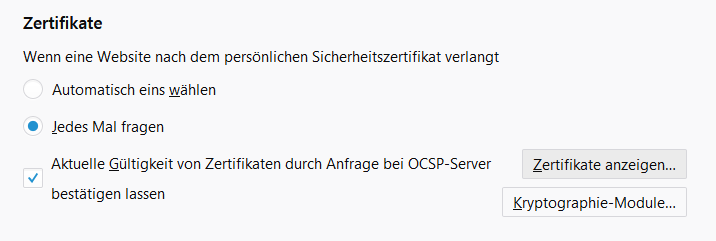
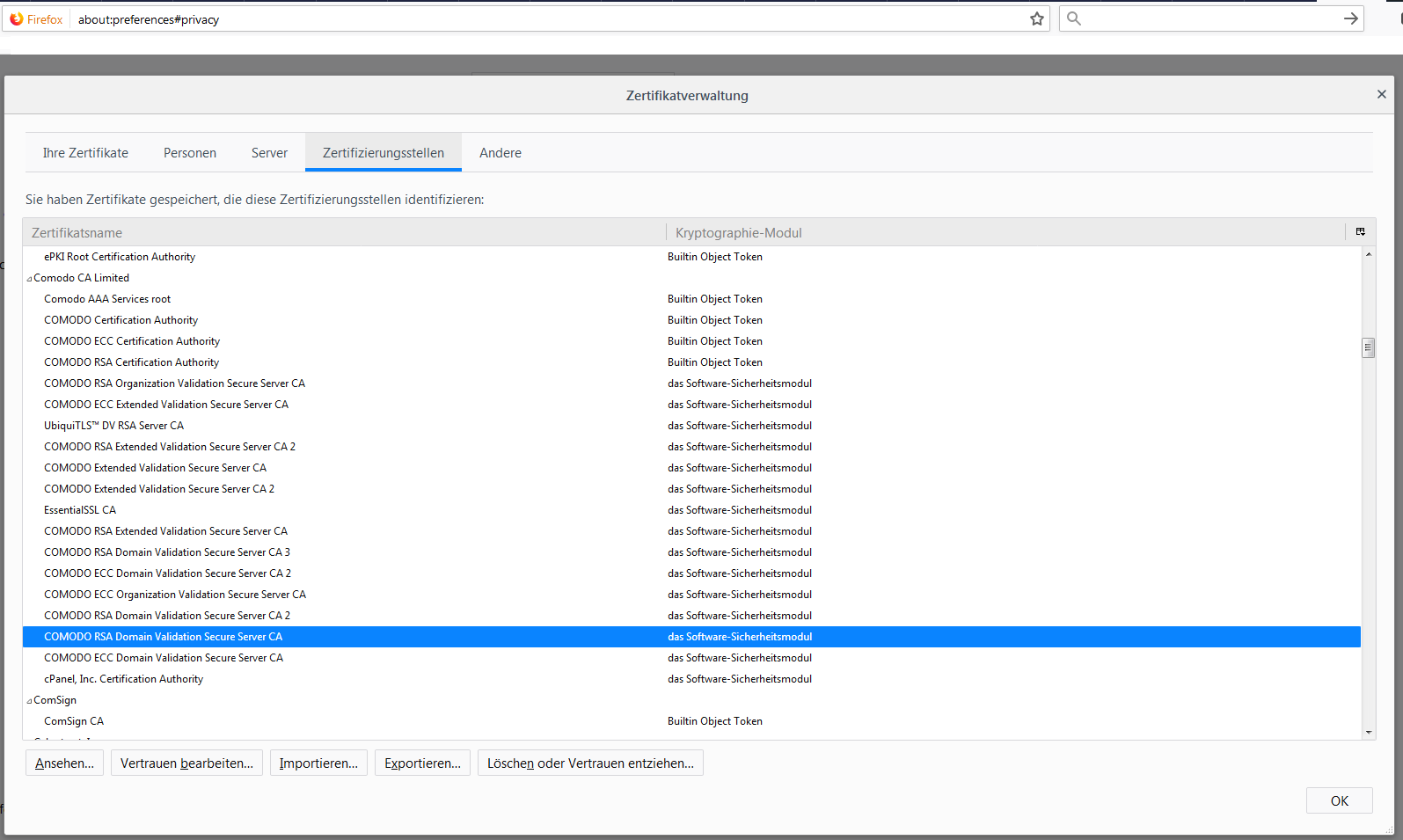
options-&gt;preferences of Firefox itself:</p>

<p><img src="/assets/post_imgs/2018-01-17-cert-chain/01.png" alt="Screenshot of browser setting on accepting personally signed certs" /></p>

<p><img src="/assets/post_imgs/2018-01-17-cert-chain/02.png" alt="Screenshot of browser's CA certificate store" /></p>

<p>Yeah that's in German, sorry, but the English version will look
basically the same.</p>

<p>In this case, notice that in the above screenshot "COMODO RSA Domain
Validation Secure Server CA"  is actually in my certificate list in
Firefox. I realised afterwards that at some point I had clicked through
the invalid certificate warnings and added the certificate to my Firefox
certificate store, to be trusted for next time. That's why I only
noticed the problem after installing a new PC with Firefox and Chrome.</p>

<p>Just to repeat myself, the "COMODO RSA Domain Validation Secure Server
CA" certificate is not part of the default suite of certificates
trusted by Firefox. I needed to download the public certificate from
COMODO
<a href="https://support.comodo.com/index.php?/Knowledgebase/Article/View/970/108/intermediate-2-sha-2-comodo-rsa-domain-validation-secure-server-ca">here</a>
and tell apache2 (the site's web server) to use that certificate and
<em>only that</em> certificate as part of the certificate chain.</p>

<p>Briefly, this meant configuring these apache2 settings ...</p>

<div class="language-bash highlighter-rouge"><div class="highlight"><pre class="highlight"><code> <span class="k">**</span>SSLCertificateKeyFile <span class="k">**</span>/etc/apache2/ssl.key/www.example.com.key
 <span class="k">**</span>SSLCertificateFile <span class="k">**</span>/etc/apache2/ssl.crt/www.example.com.crt
 <span class="k">**</span>SSLCertificateChainFile <span class="k">**</span>/etc/apache2/ssl.ca/www.example.com.ca
</code></pre></div></div>

<p>... ensuring that SSLCertificateKeyFile  contained only the <em>private
*key of the server, SSLCertificateFile contained only the *public</em>
certificate associated with the aforementioned private key and that
SSLCertificateChainFile contained only the public certificate for
"COMODO RSA Domain Validation Secure Server CA". If you have multiple
layers of signing, you need to add each intermediary CA to this file, in
the correct order. </p>

<p>This works because the certificate for the intermediary "COMODO RSA
Domain Validation Secure Server CA" is issued by "COMODO RSA
Certification Authority" and that root CA is part of the shipped set of
certificates for Firefox, Chrome, curl, openssl and any other SSL/TLS
client you care to name.</p>

<p>The certificate chain now looks like this, (see earlier openssl command
syntax):</p>

<div class="language-bash highlighter-rouge"><div class="highlight"><pre class="highlight"><code> Certificate chain

  0 s:/OU<span class="o">=</span>Domain Control Validated/OU<span class="o">=</span>Hosted by webgo
 GmbH/OU<span class="o">=</span>PositiveSSL/CN<span class="o">=</span>www.example.com
    i:/C<span class="o">=</span>GB/ST<span class="o">=</span>Greater Manchester/L<span class="o">=</span>Salford/O<span class="o">=</span>COMODO CA
 Limited/CN<span class="o">=</span><span class="k">**</span>COMODO RSA Domain Validation Secure Server CA<span class="k">**</span>

  1 s:/C<span class="o">=</span>GB/ST<span class="o">=</span>Greater Manchester/L<span class="o">=</span>Salford/O<span class="o">=</span>COMODO CA
 Limited/CN<span class="o">=</span><span class="k">**</span>COMODO RSA Domain Validation Secure Server CA<span class="k">**</span>
    i:/C<span class="o">=</span>GB/ST<span class="o">=</span>Greater Manchester/L<span class="o">=</span>Salford/O<span class="o">=</span>COMODO CA
 Limited/CN<span class="o">=</span><span class="k">**</span>COMODO RSA Certification Authority<span class="k">**</span>
</code></pre></div></div>

<p>In the first certificate, the (i)ssuer name is the (s)erver name of the
second certificate. The second validates the first. There is no need for
a third certificate because the issuer of the second certificate is part
of an established set of known root Certificate Authorities.</p>]]></content><author><name></name></author><category term="certificate" /><category term="chain" /><category term="tls" /><summary type="html"><![CDATA[After installing Firefox and Chrome on a new PC, I noticed that I was getting "issuer unknown" (Firefox: SEC_ERROR_UNKNOWN_ISSUER) errors on a website that I was checking connectivity against. The website was one that I was recently put in charge of and the organisation had a paid-for COMODO certificate for a Wordpress install.]]></summary></entry><entry><title type="html">How the IPv6 link-local address is determined</title><link href="/ip6/link-local/cve/2017/08/03/link-local.html" rel="alternate" type="text/html" title="How the IPv6 link-local address is determined" /><published>2017-08-03T01:00:00+02:00</published><updated>2017-08-03T01:00:00+02:00</updated><id>/ip6/link-local/cve/2017/08/03/link-local</id><content type="html" xml:base="/ip6/link-local/cve/2017/08/03/link-local.html"><![CDATA[<p>The IPv6 (ip6) link-local address is of significance to the link on
which the ip6 network address exists. In other words, in an ethernet
world, the link-local address only has meaning within a VLAN and is not
routeable. In principle, the address could be routed, but it is
forbidden under <a href="https://tools.ietf.org/html/rfc3513#section-2.5.6">rfc3513</a>.</p>

<blockquote>
  <p>Routers must not forward any packets with link-local source or<br />
destination addresses to other links.</p>
</blockquote>

<p>In this post I'm only going to discuss the link-local unicast address,
prefixed by FE80::/10. When I need clarity on link-local addresses I end
up on <a href="https://en.wikipedia.org/wiki/IPv6_address">Wikipedia</a> and then
at <a href="https://tools.ietf.org/html/rfc3513">rfc3513</a>. Hopefully you can get
a high-level grasp via this post and for deeper detail consult those
resources.</p>

<h2 id="whats-the-point">What's The Point?</h2>

<p>Link local addresses are integral to the ip6 <a href="https://en.wikipedia.org/wiki/Neighbor_Discovery_Protocol">Neighbor Discovery
Protocol</a>
(NDP) that allows local services and routers to be detected with zero
input from the user.</p>

<p>The local machine can build up a table of services and routers on each
link. On a linux machine you can quickly view what's out there:</p>

<div class="language-bash highlighter-rouge"><div class="highlight"><pre class="highlight"><code><span class="o">&gt;</span> <span class="nv">$ </span>ip <span class="nt">-6</span> neighbor show
<span class="o">&gt;</span> fe80::250:56ff:fe86:1234 dev eth1 lladdr 00:50:56:86:12:34 STALE<span class="se">\</span>
<span class="o">&gt;</span> fc01:e5:1102::111:21 dev vlan12  FAILED
</code></pre></div></div>

<p>But getting into NDP and what this table tells you is not something I
have time to do here.</p>

<h2 id="why-is-there-a-link-local-address-on-my-interface">Why Is There A Link-Local Address On My Interface?</h2>

<p>Operating systems that have an ip6 stack enabled will assign themselves
a link local address. They will ordinarily do that even when DHCPv6
exists on the network. The mechanism itself is known as stateless
address autoconfiguration (SLAAC).</p>

<p>When determining an address to use, a linux system appears to conform
to <a href="https://tools.ietf.org/html/rfc2464">rfc2464</a> although
<a href="https://tools.ietf.org/html/rfc4862">rfc4862</a> appears to ease the
precise definition.</p>

<blockquote>
  <p>The OUI of the Ethernet address (the first three octets) becomes the<br />
company_id of the EUI-64 (the first three octets). The fourth and<br />
fifth octets of the EUI are set to the fixed value FFFE hexadecimal.<br />
The last three octets of the Ethernet address become the last three<br />
octets of the EUI-64. <br />
– <a href="https://tools.ietf.org/html/rfc2464">rfc2464</a> p. 3</p>
</blockquote>

<p>The "Universal/Local" (U/L) bit of the original MAC address is also
flipped.</p>

<p>For example:</p>

<div class="language-bash highlighter-rouge"><div class="highlight"><pre class="highlight"><code><span class="o">&gt;</span> vnet0     Link encap:Ethernet  HWaddr fe:54:00:d7:40:40
<span class="o">&gt;</span>           inet6 addr: fe80::fc54:ff:fed7:4040/64 Scope:Link
</code></pre></div></div>

<p>The MAC address is fe:54:00:d7:40:40. First ff:fe is inserted in the 4th
and 5th octets to become fe:54:<strong>ff:fe</strong>:40:40 and then the
<a href="https://en.wikipedia.org/wiki/MAC_address">locally-administered</a> bit is
flipped (0xe minus 2 equals 0xc). The result is
f<strong>c</strong>:54:<strong>ff:fe</strong>:40:40 and the full address with the link-local
network prepended is<br />
fe80::fc54:ff:fed7:4040/64.\</p>

<p>Two things to clarify:</p>

<ol>
  <li>If the locally-administered bit is set, then it is unset and vice
versa.</li>
  <li>In ip6 addresses :: (double colon) is shorthand for zeros. The full
address is actually fe80:000:000:000:fc54:ff:fed7:4040/64.</li>
</ol>

<p>Windows is a lot different, according to <a href="https://social.technet.microsoft.com/Forums/office/en-US/5bdcfd90-aebb-4fdd-ac13-35376d7f62d7/how-does-windows-7-create-ipv6-link-local-addresses?forum=ipv6">this Microsoft technet
post</a>,
which references <a href="https://technet.microsoft.com/en-us/library/2007.08.cableguy.aspx">this microsoft technet
post</a>,
the address is assigned randomly since Vista. It's not referenced in
the technet post, but <a href="https://tools.ietf.org/html/rfc4941">rfc4941</a>
describes two randomised identifier processes.</p>

<h2 id="was-cve-2016-1409-a-link-local-bungle">Was <a href="https://cve.mitre.org/cgi-bin/cvename.cgi?name=CVE-2016-1409">CVE-2016-1409</a> A Link-Local Bungle?</h2>

<p>I have a suspicion (read "guessing"), that
<a href="https://cve.mitre.org/cgi-bin/cvename.cgi?name=CVE-2016-1409">CVE-2016-1409</a>
was a mixture of two failures in violation of the RFCs. Namely that:</p>

<ol>
  <li>Cisco and other vendors would route Neighbor Advertisements across
hops.</li>
  <li>In-path routers did not decrement hop-limit when (1) happens or the
final recipient was accepting NA messages when hop-limit did not
equal 255.</li>
</ol>]]></content><author><name></name></author><category term="ip6" /><category term="link-local" /><category term="cve" /><summary type="html"><![CDATA[The IPv6 (ip6) link-local address is of significance to the link on which the ip6 network address exists. In other words, in an ethernet world, the link-local address only has meaning within a VLAN and is not routeable. In principle, the address could be routed, but it is forbidden under rfc3513.]]></summary></entry><entry><title type="html">Roll Your Own Linux Distro for Children</title><link href="/debian/linux/kids/children/2017/02/05/kids-distrp.html" rel="alternate" type="text/html" title="Roll Your Own Linux Distro for Children" /><published>2017-02-05T00:00:00+01:00</published><updated>2017-02-05T00:00:00+01:00</updated><id>/debian/linux/kids/children/2017/02/05/kids-distrp</id><content type="html" xml:base="/debian/linux/kids/children/2017/02/05/kids-distrp.html"><![CDATA[<blockquote>
  <p>When I migrated my web presence (in 2026) to here, this was one of the 
few articles that I bothered to bring over. Entirely out of nostalgia.</p>
</blockquote>

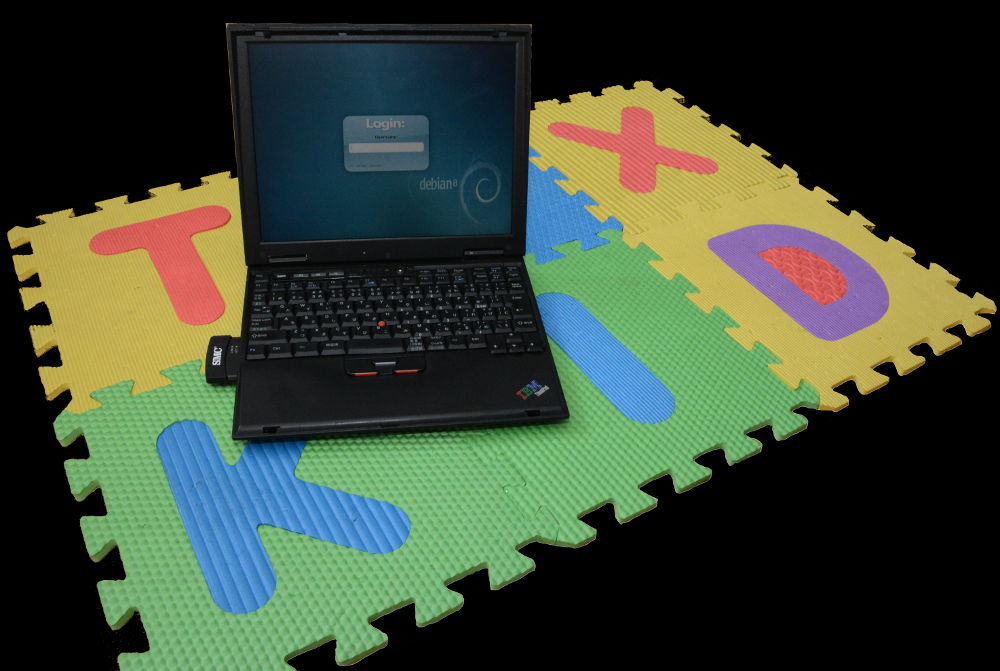
<p><img src="/assets/post_imgs/2017-02-05-kids-distro/01.jpg" alt="Photo of old IBM laptop on mat that reads TUX KID" /></p>

<p>Looking for a kid-friendly linux distro? I recommend you review "<a href="http://www.moff.tech/2017/01/in-search-of-linux-distro-for.html">In
search of a Linux distro for a kindergarten
kid</a>"
about distros for children. Want to custom build your own? Then you're
in the right place.</p>

<p>You better already be handy with Linux, otherwise this is going to be a
steep learning curve, but worthwhile.</p>

<p>The summary of "<a href="http://www.moff.tech/2017/01/in-search-of-linux-distro-for.html">In search of a Linux distro for a kindergarten
kid</a>"
was that I didn't really like any of the distros on offer. There were a
couple of worthy options and it does depend on your expectations. I
decided to make my own. This describes how I went about it.</p>

<p>I'll stress again that I wanted a system for a Kindergarten aged
child - meaning from 3 until 6 years old. By 5 or 6, a number of these
applications will be of little interest.</p>

<h3 id="steps">Steps</h3>
<p>The major tasks are:</p>

<ol>
  <li>Install a base system.</li>
  <li>Install a GUI and login manager.</li>
  <li>Configure the login manager.</li>
  <li> Install the desired applications.</li>
  <li>Customise the GUI.</li>
</ol>

<h3 id="install-basic-system">Install Basic System</h3>
<p>This whole post is about getting a low-spec system going. This was all
set up on an IBM <a href="http://www.thinkwiki.org/wiki/Category:X24">x24</a>
laptop:</p>

<div class="language-bash highlighter-rouge"><div class="highlight"><pre class="highlight"><code>root@x24:<span class="se">\~\$</span> <span class="nb">cat</span> /proc/cpuinfo
processor       : 0
vendor_id       : GenuineIntel
cpu family      : 6
model           : 11
model name      : Mobile Intel<span class="o">(</span>R<span class="o">)</span> Pentium<span class="o">(</span>R<span class="o">)</span> III CPU - M  1066MHz
stepping        : 4
microcode       : 0x2
cpu MHz         : 731.500
cache size      : 512 KB

<span class="o">&gt;</span> root@x24:<span class="se">\~\$</span> <span class="nb">cat</span> /proc/meminfo
<span class="o">&gt;</span> MemTotal:         628804 kB
<span class="o">&gt;</span> MemFree:          396500 kB
<span class="o">&gt;</span> MemAvailable:     466904 kB
</code></pre></div></div>

<p>Yep, 1066MHz CPU on 628MB RAM.</p>

<h4 id="what-about-default-ubuntu">What About Default Ubuntu?</h4>
<p>If you've got a machine that can handle the overhead of a default
Ubuntu install. You could simply install the Ubuntu desktop and hope
that your child doesn't find their way into terriffic trouble.
Otherwise, every other day, you're going to need to reinstall Ubuntu.</p>

<p>If you're going the default Ubuntu route, the "junior" group may be
problematic. The "junior" group caused all kinds of unexpected
headaches. Make sure that user is in related device and sound groups.
Edit /etc/group or use:</p>

<blockquote>
  <p>Debian-Applications-&gt;System-&gt;Administration-&gt;User accounts Admin.</p>
</blockquote>

<h4 id="custom-ubuntu">Custom Ubuntu</h4>
<p>Just to repeat, my aim was to have a system with a lightweight as
possible desktop environment, while still easy to use.</p>

<p><a href="https://help.ubuntu.com/community/Installation/MinimalCD">Download</a> and
Install the Ubuntu mini distributon. It should be about 50MB in size.
The system that you will have installed after that will likely/hopefully
not have any GUI. If you encounter an option to install a desktop
environment, skip it.</p>

<p>When you set up a user, use the child's first name as the username and
password*. It's fun to teach them how to type out their name and then
amazing see them do it later without your help.</p>

<p>Installing that won't take long. Soon you'll be rebooting into non-GUI
system and will need to login with the user credentials you set during
the install.</p>

<p>You'll need to get to the machine remotely of course!</p>

<blockquote>
  <p># sudo apt-get install ssh</p>
</blockquote>

<p>Find the IP of the machine (run from terminal on machine):</p>

<blockquote>
  <p># /sbin/ifconfig</p>
</blockquote>

<h3 id="install-gui-and-login-manager">Install GUI and Login Manager</h3>
<p>We'll install LXDE, because it's lightweight and works. Use "slim"
as the login manager.</p>

<blockquote>
  <p>apt-get install lxde slim</p>
</blockquote>

<p>Life will be easier if you also install these package immediately:</p>

<blockquote>
  <p>apt-get install aptitude ssh lxsession-logout lxde-common</p>
</blockquote>

<p>To get wireless networking right on LXDE, I recommend removing
network-manager and installing wicd:</p>

<blockquote>
  <p>sudo apt-get remove network-manager</p>
</blockquote>

<blockquote>
  <p>sudo apt-get install wicd</p>
</blockquote>

<h3 id="configure-login-manager">Configure Login Manager</h3>
<p>Under this setup, I was always needed to specify the session when
logging in. That's hopeless if you expect a 3 year old to step through
the login process. Set the default session permanently as so:</p>

<div class="language-bash highlighter-rouge"><div class="highlight"><pre class="highlight"><code><span class="c"># vi /usr/share/xsessions/LXDE.desktop</span>
      <span class="nv">Exec</span><span class="o">=</span>/usr/bin/startlxde

<span class="c"># vi /etc/slim.conf</span>
      login_cmd           <span class="nb">exec</span> /bin/bash <span class="nt">-login</span> /etc/X11/Xsession startlxde
</code></pre></div></div>

<h3 id="applications">Applications</h3>
<p>After looking at all the other distros, see also my aforementioned
<a href="http://www.moff.tech/2017/01/in-search-of-linux-distro-for.html">post</a>
I determined that these apps were the most suitable as well as being
available in the debian repository. Meaning that they could be installed
without hacking, compiling or sacrifices to some Diety.</p>

<p>Most of these will install with "apt-get install &lt;name&gt;" but if the
package is not found then install something like aptitude to search for
similarly named packages. Packages do change names occasionally.</p>

<ul>
  <li>tuxpaint</li>
  <li>tux math</li>
  <li>tux typing</li>
  <li>PySyCache</li>
  <li>Childsplay</li>
  <li>pySioGame</li>
  <li>gCompris</li>
  <li>Potato Guy</li>
  <li>BamBam* </li>
  <li>Numpty Physics **</li>
</ul>

<p>* to exit BamBam, actually type "quit".</p>

<p>** Numpty Physics is really cool, but hard on the CPU.</p>

<p>There are a number of KDE only apps (bundled into Edubuntu)  that you
cannot use on LXDE. I tried, I failed, if they're not listed above,
they didn't work for me.</p>

<h3 id="customise-the-gui">Customise the GUI</h3>
<p>Although the earlier steps sound hard, they really aren't and
customising the desktop is where you'll spend the majority of your
time. It's a matter of personal preference after all.</p>

<p>Customise the desktop simply by right clicking.</p>

<ul>
  <li>Clear all icons including "Trash Can". </li>
  <li>Add game icons to the desktop by right clicking on the relevant
icons in the "Menu".</li>
</ul>

<p>Add the LXTerminal shell as an icon on the desktop - yeah this is a risk
in itself, but life will get really interesting if you lose the taskbar
or menus after junior hacks away at your work. </p>

<p>Tidy up the menu bar. Right click on the bar to add and remove applets
and so on. Remove as much as you dare. Removing the menu bar completely
is possible, but getting it back is not necessarily easy. If you need to
recover your menu or task bar, start by looking here.</p>

<p>You can add the panel item "Keyboard Layout Handler" if you need to be
able to switch between keyboard types. Meaning, if you need to switch
between German and US keyboard layouts then this is the applet to use.
I'm not talking about actual languages.</p>

<p>If you need to change the default keyboard layout then you'll have to
edit /etc/default/keyboard. See /usr/share/X11/xkb/symbols/ to review
the syntax of the types.</p>

<div class="language-bash highlighter-rouge"><div class="highlight"><pre class="highlight"><code><span class="nv">$ </span><span class="nb">cat</span> /etc/default/keyboard
    <span class="c"># KEYBOARD CONFIGURATION FILE</span>
    <span class="c"># Consult the keyboard(5) manual page.</span>
      <span class="nv">XKBMODEL</span><span class="o">=</span><span class="s2">"pc105"</span>
      <span class="nv">XKBLAYOUT</span><span class="o">=</span><span class="s2">"us"</span>
      <span class="nv">XKBVARIANT</span><span class="o">=</span><span class="s2">""</span>
      <span class="nv">XKBOPTIONS</span><span class="o">=</span><span class="s2">""</span>
      <span class="nv">BACKSPACE</span><span class="o">=</span><span class="s2">"guess"</span>
</code></pre></div></div>

<h3 id="quick-problem-suggestions">Quick Problem Suggestions</h3>
<p>Have no login screen? Switch to the console using ctrl-alt-f1. Then
install SSH (see above).</p>

<p>Have problems with sound? Install alsa-base.</p>

<p>The power button (added by default) did not work for me and you may need
to fix the logout button on the menu bar by installing
lxsession-logout.</p>

<p>Check whether the ACPI packages are installed. Depending on the age of
your machine, ACPI might be supported but not work very well. For
example on the laptop I had, it stopped the system from powering off at
shutdown, so I removed it:</p>

<blockquote>
  <p># sudo apt-get install acpi acpid</p>
</blockquote>

<h3 id="finally">Finally</h3>
<p>Even if the final version is not perfect in your own eyes, your child
will love having their own system. Creating the system is a great
learning exercise, but fixing it later is even more so. The reward
really is in watching kids excitement in interacting with the games and
solving puzzles.</p>

<p>Have fun! Any questions or comments, drop me a line.</p>

<p><img src="/assets/post_imgs/2017-02-05-kids-distro/02.jpg" alt="Photo of old IBM laptop sitting on mat that reads TUX KID. On the screen is a Debian GUI login prompt" /></p>]]></content><author><name></name></author><category term="Debian" /><category term="Linux" /><category term="Kids" /><category term="Children" /><summary type="html"><![CDATA[When I migrated my web presence (in 2026) to here, this was one of the few articles that I bothered to bring over. Entirely out of nostalgia.]]></summary></entry><entry><title type="html">In search of a Linux distro for a kindergarten kid</title><link href="/debian/linux/kids/children/2017/01/04/kids-distro-search.html" rel="alternate" type="text/html" title="In search of a Linux distro for a kindergarten kid" /><published>2017-01-04T00:00:00+01:00</published><updated>2017-01-04T00:00:00+01:00</updated><id>/debian/linux/kids/children/2017/01/04/kids-distro-search</id><content type="html" xml:base="/debian/linux/kids/children/2017/01/04/kids-distro-search.html"><![CDATA[<blockquote>
  <p>When I migrated my web presence (in 2026) to here, this was one of the 
few articles that I bothered to bring over. Entirely out of nostalgia.</p>
</blockquote>

<h3 id="tldr">tl;dr</h3>
<p>I gave up and made my own kid-friendly install nominally based on
Ubuntu. That took a few hours and is a hell of a lot more interesting
than researching distros for children.</p>

<p>I do a wrap up at the end, go read that if you hate multi-syllabic
sentences.</p>

<h3 id="never-mind-all-that-introduction">Never Mind All That: Introduction</h3>
<p>It's not easy to say when the best time is to meaningfully introduce a
computer into a child's life. At age 3 they already have a pretty good
handle on navigating YouTube and a tablet. I'm not an advocate of
getting kids into computers as early as possible, despite being a tech
geek. In any event, I recently found myself hunting for a Linux distro
for kids.</p>

<h3 id="kids-need-to-know-the-linux-right">Kids Need to Know the Linux, Right?</h3>
<p>I wasn't sure that there were any kid-friendly distros when I started
my search, but I quickly found several prominent blog posts that pointed
to a number of 'kids' and 'educational' distros. These posts
generally spend a good deal of time waxing lyrical over how learning
Linux was of paramount importance. I don't know that I followed these
arguments.</p>

<p>In general you're putting a child down in front of a graphical user
interface. You don't expect your 5 year old to run the Ubuntu package
manager or need them to figure out how to get Eclipse's bash
interpreter to work. Using a GUI is not learning open source; it simply
helps a kid come to grips with the oddball ways that adults structure
the world.</p>

<h3 id="what-do-you-need">What Do You Need? </h3>
<p>My expectations for a distro aimed at a kindergarten aged child were
along these lines:</p>

<ul>
  <li>Something to keep a 3 to 5 year old entertained. </li>
  <li>Educational in nature, but in the form of fun games.</li>
  <li>Simple to switch on and off.</li>
  <li>Simple to start and stop applications.</li>
  <li>Safe web browsing options when browser available.</li>
  <li>No need to customise applications, i.e. applications 'just work'.</li>
  <li>Distro is lightweight in size and resource requirements.</li>
</ul>

<p>The principles were that the distro would run on old hardware. Once
running, the child couldn't wreck the whole install simply trying to
work how to use (or even just start) an application.</p>

<p>At the start of my search it seemed hopeful, but when I dug into the
recommended distros the results were disappointing overall. I share here
my notes on each distribution in the hope that it will quickly guide
caregivers in the right direction.</p>

<h3 id="did-you-really-try-this-carnival-of-isos">Did You Really Try This Carnival of ISOs?</h3>
<p>Unless stated otherwise, I tried the distros on a Toshiba Satellite Pro
A200 laptop, which is certainly not new hardware, but has capable and
fully Linux-supported hardware. The distros <em>were</em> put in front of a 3
year old to gauge response and interest levels.</p>

<h3 id="the-results">The Results </h3>
<p>Remember that I'm interested in Kindergarten distros.</p>

<h4 id="sugar-on-a-stick"><a href="https://www.sugarlabs.org/">Sugar on a Stick</a></h4>
<p><img src="/assets/post_imgs/2017-01-04-kids-distro-search/01.png" alt="Sugar on a Stick stock image showing USB thumb drives" /></p>

<p>Apparently this grew out of the One Laptop Per Child initiative. The GUI
concept is inventive, but from personal experience it's not appealing
to a youngster. On the live CD, the games appeared to be dry, some
application wouldn't start (paint &amp; physics) and the only usable
application to keep a 3 year old entertained was "Maze". The project
is still alive.</p>

<p>I deemed it unsuitable for the kindergarten age-group, not just because
of the applications, but because the test-child took zero interest in
the user interface.</p>

<h4 id="doudou-linux"><a href="http://www.doudoulinux.org/web/english/index.html">Doudou Linux</a></h4>
<p><img src="/assets/post_imgs/2017-01-04-kids-distro-search/02.png" alt="Doudou Linux menu screenshot" /></p>

<p>The project is dead but a live CD image can still be downloaded. The UI
is fugly, but I think quite appealing to children. This one really is
aimed at youngsters. There's nothing extensible about it and I don't
think it can be installed to disk. It's tidily put together (apart from
the weird application switching) and not a resource hog - takes about
150MB of memory before an application is launched.</p>

<h4 id="qimo"><a href="http://www.qimo4kids.com/">Qimo</a></h4>
<p><img src="/assets/post_imgs/2017-01-04-kids-distro-search/03.png" alt="Qimo desktop screenshot" /></p>

<p>The project is dead and the iso image is hard to find but downloadable
via torrents, which is how I got my copy (and who knows what else). When
you boot the Qimo iso you can decide whether to run as a live CD or
install to disk. Based on the applications, tt's suitable for kids
starting school. The xfce GUI is nice and the install isn't full of
unnecessary applications. It uses 500MB of memory before any
applications are started.</p>

<p>Unfortunately the live CD experience was terrible with actual hardware,
although worked perfectly in <em>VMWare Workstation</em>. I probably would have
installed and used Qimo had the live CD worked well. Since the project
is dead, I didn't want to be fighting hardware detection problems on a
base install that had no update path.</p>

<p>Also, The Matrix style screensaver rather dates it :-D</p>

<p>I persevered after reading a <a href="https://www.ibm.com/developerworks/community/blogs/InsideSystemStorage/entry/kindergarten_desktop_linuxkidx_qimo_and_foresight">blog
post</a>
that Qimo could be installed on Ubuntu using the qimo-session and
qimo-wallpaper packages. After trying it for myself, I can tell you that
this is no longer the case. Qimo package support was possible in Ubuntu
12 (quite old now), but it is no longer an option.</p>

<h4 id="linuxkidx"><a href="https://sourceforge.net/projects/linuxkidx/">LinuxKidX</a></h4>
<p><img src="/assets/post_imgs/2017-01-04-kids-distro-search/04.jpg" alt="LinuxKidX desktop screenshot" /></p>

<p>The sourceforge website screenshots look amazing, but there is no
official homepage although <a href="http://linuxkidx.blogspot.de/">an old blog</a>
still exists. Even the donation link was broken.</p>

<p>The download from sourceforge works. I really like the art concept. I
tried this on a <em>VMWare Workstation</em> environment only. The distro
appears to be simply a live CD and it suffered from a few technical
issues, namely that some applications would not start and I couldn't
switch into a getty - if that means something to you, you'll know why
it's annoying.</p>

<p>The distro is cute, but it comes with unnecessary applications and has a
KDE interface, so this will drag on old hardware. The running memory
footprint is 580MB before you even start applications, which makes it
one of the more resource hungry distros.</p>

<h4 id="foresight-for-kids"><a href="http://www.foresightlinux.org/">Foresight for Kids</a></h4>
<p><img src="/assets/post_imgs/2017-01-04-kids-distro-search/05.png" alt="Foresight desktop screenshot" /></p>

<p>This project is well dead, including the website. I didn't try to find
the downloads as the 'top distros for kids' reviews that I read on the
website reviews didn't distinguish Foresight as particularly different
or special.</p>

<p>As a side note, the reviews always mentioned the Conary package
management system, which I'd never heard of. I think that the reason
they keep mentioning it was because these reviews eat off each other.
The first popular post that mentioned Foresight probably mentioned
Conary and because nobody actually tries this stuff before reviewing it.
Reviews of Foresight are still appearing on the web even though the
distro can't be obtained. And yet. here I am, reviewing
Foresight.…ugh.</p>

<h4 id="kiddix"><a href="http://www.kiddix-computing.com/">Kiddix</a></h4>
<p>I'm not sure what happened here. The distro got reviews and there is a
<a href="http://www.mike-gualtieri.com/projects/kiddix">nice page</a> by the
author, but the distro is unobtainable - assuming it ever was a
distribution. There's a nice screenshot. <a href="https://www.cnet.com/news/pay-what-you-want-for-kiddix-os/">This
post</a> and
similar make me wonder whether it was a cynical vapourware project for
someone out to make a quick buck.</p>

<p><img src="/assets/post_imgs/2017-01-04-kids-distro-search/06.jpg" alt="Money raining down on executives" /></p>

<h4 id="edubuntu"><a href="https://www.edubuntu.org/">Edubuntu</a></h4>
<p><img src="/assets/post_imgs/2017-01-04-kids-distro-search/07.jpg" alt="Image of Tux with Ubuntu logo on belly" /></p>

<p>This is a Canonical sourced framework, which is the organisation behind
Ubuntu. I didn't try this because I didn't see the need to download
gigabytes of installer data for something I already knew was not what I
was needed.</p>

<p>What's useful to see is the installation on an existing Ubuntu system
on the download page and specifically it's the ubuntu-edu-preschool
package which is promising. I've verified that Ubuntu version 16 has
this package, so simply installing the latest Ubuntu and then the
"edu" package of choice is all you really need to do here.</p>

<p>A <a href="http://packages.ubuntu.com/trusty/misc/ubuntu-edu-preschool">quick review
</a>of the
packages that come down with ubuntu-edu-preschool reveal a few
applications that are not bundled with the other distros I looked at,
namely: blinken, kanagram, khangman, klettres, ktuberling, and pairs. A
few of those are a variety of alphabet drills. All of them are KDE
applications and will not run unless the full KDE environment is
installed.</p>

<p>The advantages of the Edubuntu route is that the install is easy and
that the distribution will be supported long term.</p>

<p>The downsides are that you'll need to install on a device that has some
processing power along with ample memory and storage. A young child will
not be able to sit down in front of this and intuitively navigate around
an Ubuntu system. You get a whole Ubuntu system, not a cut-down kid
friendly one.</p>

<h4 id="ubermix"><a href="http://www.ubermix.org/">ubermix</a></h4>
<p>This is a specifically school targeted distro and not kindergarten-kid
friendly in any way. It looks like a great high school (college)
distribution.</p>

<p><img src="/assets/post_imgs/2017-01-04-kids-distro-search/08.jpg" alt="Kid shrugging her shoulders" /></p>

<h3 id="in-summary---kindergarten">In Summary - Kindergarten</h3>
<p>For kindergarten kids the options are limited. There's a niche here
waiting to be exploited!</p>

<ul>
  <li>Try Doudou and Qimo. Both distros are dead but they may work on your
hardware</li>
  <li>LinuxKidX may work on an old system.</li>
</ul>

<h3 id="in-summary---post-kindergarten"> In Summary - Post Kindergarten</h3>
<p>Give the Edubuntu packages a try if you're an Ubuntu user, otherwise
ubermix is an interesting and fllexible option especially for your
teenager on the go.It'd just be nice to know where they're going, but
spyware doesn't seem to be a part of any of these distribiutions.</p>

<h3 id="altogether-now">Altogether Now!</h3>
<ul>
  <li>Green - Impressive.</li>
  <li>Yellow - Meh.</li>
  <li>Red - Not a great option, avoid.</li>
  <li>Grey - Not evaluated.</li>
  <li>Black -  Not possible to test</li>
</ul>

<table>
  <thead>
    <tr>
      <th>Distro</th>
      <th>Ages</th>
      <th>Active</th>
      <th>Obtainable</th>
      <th>Live CD</th>
      <th>Local</th>
      <th>Friendly</th>
      <th>System</th>
    </tr>
  </thead>
  <tbody>
    <tr>
      <td><a href="https://www.sugarlabs.org/">Sugar Stick</a></td>
      <td>5+</td>
      <td>GREEN</td>
      <td>GREEN</td>
      <td>GREEN</td>
      <td>GREEN</td>
      <td>Y</td>
      <td>Y</td>
    </tr>
    <tr>
      <td><a href="http://www.doudoulinux.org/web/english/index.html">Doudou</a></td>
      <td>2+</td>
      <td>R</td>
      <td>Y</td>
      <td>GREEN</td>
      <td>R</td>
      <td>GREEN</td>
      <td>GREEN</td>
    </tr>
    <tr>
      <td><a href="http://www.qimo4kids.com/">Qimo</a></td>
      <td>2+</td>
      <td>R</td>
      <td>Y</td>
      <td>Y</td>
      <td>B</td>
      <td>GREEN</td>
      <td>R</td>
    </tr>
    <tr>
      <td><a href="https://sourceforge.net/projects/linuxkidx/">LinuxKidX</a></td>
      <td>?</td>
      <td>R</td>
      <td>GREEN</td>
      <td>GREEN</td>
      <td>B</td>
      <td>Y</td>
      <td>R</td>
    </tr>
    <tr>
      <td><a href="http://www.foresightlinux.org/">Foresight</a></td>
      <td>?</td>
      <td>R</td>
      <td>R</td>
      <td>B</td>
      <td>B</td>
      <td>B</td>
      <td>B</td>
    </tr>
    <tr>
      <td><a href="http://www.kiddix-computing.com/">Kiddix</a></td>
      <td>?</td>
      <td>R</td>
      <td>R</td>
      <td>B</td>
      <td>B</td>
      <td>B</td>
      <td>B</td>
    </tr>
    <tr>
      <td><a href="https://www.edubuntu.org/">Edubuntu</a></td>
      <td>10+</td>
      <td>GREEN</td>
      <td>GREEN</td>
      <td>R</td>
      <td>GREEN</td>
      <td>Y</td>
      <td>R</td>
    </tr>
    <tr>
      <td><a href="http://www.ubermix.org/">ubermix</a></td>
      <td>5+</td>
      <td>GREEN</td>
      <td>GREEN</td>
      <td>Grey</td>
      <td>Grey</td>
      <td>Grey</td>
      <td>Grey</td>
    </tr>
  </tbody>
</table>]]></content><author><name></name></author><category term="Debian" /><category term="Linux" /><category term="Kids" /><category term="Children" /><summary type="html"><![CDATA[When I migrated my web presence (in 2026) to here, this was one of the few articles that I bothered to bring over. Entirely out of nostalgia.]]></summary></entry><entry><title type="html">Software Defined Radio and ADS-B with RTL-SDR</title><link href="/hackrf/ads-b/rtl-sdr/2016/10/23/rtl-sdr.html" rel="alternate" type="text/html" title="Software Defined Radio and ADS-B with RTL-SDR" /><published>2016-10-23T01:00:00+02:00</published><updated>2016-10-23T01:00:00+02:00</updated><id>/hackrf/ads-b/rtl-sdr/2016/10/23/rtl-sdr</id><content type="html" xml:base="/hackrf/ads-b/rtl-sdr/2016/10/23/rtl-sdr.html"><![CDATA[<p>I recently participated in an introduction to <a href="https://en.wikipedia.org/wiki/Software-defined_radio">Software Defined
Radio</a>
(<a href="https://en.wikipedia.org/wiki/Software-defined_radio">SDR</a>). The point
of the introduction was to get an RTL-SDR device running and then check
out ADS-B. This was a load of fun and I've pulled together here a few
notes to document my experience as a newbie.</p>

<p>The notes here focus on the software that worked for me, with particular
focus on getting meaningful ADS-B data.</p>

<h3 id="what-is-sdr">What is SDR?</h3>

<p>Software Defined Radio (SDR) has advantages over traditional radio
concepts by farming aspects of signal processing to software, rather
than requiring expensive hardware. Additionally, SDR provides a
practical solution to handling tracts of frequencies at the same time.</p>

<h3 id="what-is-rtl">What is RTL?</h3>

<p>RTL is shorthand for the affordable and apparently versatile Realtek
2832U chipset found in the SDR dongles referenced in this blog. See more
information on the <a href="http://rtlsdr.org/">rtlsdr.org</a> website.</p>

<h3 id="what-is-ads-b">What is ADS-B?</h3>

<p>The introduction I attended was to demonstrate the RTL-SDR as a radio
receiver and then move to listening in on
<a href="https://en.wikipedia.org/wiki/Automatic_dependent_surveillance_–_broadcast">ADS-B</a>
data from aircraft. This data includes flight information like where the
aircraft is in the air, how fast it's moving, flight number, an ICAO
24-bit transponder code and so on.</p>

<h3 id="is-listening-to-ads-b-legal-">Is Listening to ADS-B legal?  </h3>

<p>Apparently so and commonly done, since services
like <a href="https://www.flightradar24.com/">FlightRadar24</a> openly track the
same data. It is probably safe to say that it is not illegal to listen
to anything on the radio spectrum since it is in the public domain</p>

<h3 id="what-rtl-sdr-should-i-buy">What RTL-SDR Should I Buy?</h3>

<p><img src="/assets/post_imgs/2016-10-23-rtl-sdr/01.jpg" alt="Picture of NooElec SDR" /></p>

<p><em>NooElec NESDR Mini USB RTL-SDR</em></p>

<p>Two weeks before the SDR introduction was scheduled, I purchased a
<a href="https://www.amazon.de/NooElec-NESDR-SMArt-Antennen-R820T2-basierte/dp/B01GDN1T4S/">NooElec NESDR SMArt - Premium
RTL-SDR</a>
via Amazon but the thing never showed up. At the last minute I purchased
instead the <a href="https://www.amazon.de/gp/product/B00JQX5HT6/">NooElec NESDR Mini USB
RTL-SDR</a> (pictured right),
which arrived the next day (thanks Amazon Prime). The RTL appears to be
the same in both, the difference is that the former device had three
aerials and an SMA input. The SMA is supposedly more versatile, but
adapters are available. The aerial on the latter and cheaper unit isn't
fabulous, but for my initial purpose it worked well.</p>

<h3 id="software---windows">Software - Windows</h3>

<p>First off, if you bought a NooElec device, you'll need to follow the
<a href="http://www.nooelec.com/store/qs/#windows">instructions </a>for installing
the correct drivers under Windows. There's another nice quick-start
guide <a href="http://www.rtl-sdr.com/rtl-sdr-quick-start-guide/">here</a>.</p>

<h4 id="sdrsharp--sdr">SDRSharp | SDR#</h4>

<p>Under Windows I was easily able to use the SDR Sharp (SDR#) software to
tune into FM radio stations and <a href="https://en.wikipedia.org/wiki/Amateur_radio">amateur
</a>frequencies. It seems to
be the general-purpose Windows radio software.</p>

<p><img src="/assets/post_imgs/2016-10-23-rtl-sdr/02.png" alt="Screenshot of SDR# Interface" /></p>

<p>The important config points are that you select RTL-SDR from the Source
and then select the cog icon at top to bring up the Device settings
(right).</p>

<p><img src="/assets/post_imgs/2016-10-23-rtl-sdr/03.png" alt="Screenshot of SDR# Interface selecting RTL-SDR" /></p>

<p>There is also <a href="http://www.hdsdr.de/">HDSDR </a>and <a href="http://cubicsdr.com/">CubicSDR
</a>that appear to do the same job as SDR#. I did
play around with them, but SDR# is the one I primarily use under
Windows.</p>

<p>The moment that you need to do anything interesting, however, it seems
that you need to switch to Linux. I can confirm that on Windows 10,
dump1090 works very nicely with VirtualRadar and with almost no
configuration required. This post isn't going to discuss setting all
that up, it's well enough documented on the
<a href="http://rtlsdr.org/">rtlsdr.org</a> website.</p>

<h3 id="software---linux">Software - Linux</h3>

<p>For a Windows-only person, this isn't as daunting as it sounds. You can
run Linux as a <a href="https://en.wikipedia.org/wiki/Virtual_machine">Virtual
Machine</a> on your Windows
system. A number of steps need to be undertaken to get that going. This
starts with installing <a href="https://www.virtualbox.org/wiki/Downloads">VirtualBox
</a>or <a href="https://my.vmware.com/web/vmware/downloads">VMware
Player</a>, both are free
downloads. VirtualBox seems like less hassle but I find VMware Player
more flexible and useful. For this situation, VirtualBox is fine.</p>

<p>Also remember to connect the RTL device to the Virtual Machine (VMware
screenshot):</p>

<p><img src="/assets/post_imgs/2016-10-23-rtl-sdr/04.png" alt="Screenshot of VMWare Player VM config" /></p>

<p>Once you have a Linux system running, either as a Virtual Machine or
natively installed you might find the following packages useful to
install (these are debian / ubuntu packages):</p>

<div class="language-bash highlighter-rouge"><div class="highlight"><pre class="highlight"><code><span class="nv">$ </span><span class="nb">sudo </span>apt-get <span class="nb">install </span>git cmake libqt5core5 libqt5core5a libqt5dbus5
libqt5gui5 libqt5network5 libqt5svg5 libqt5widgets5 qt5-default
gnuradio-audio gnuradio gnuradio-dev gnuradio-dev
libgnuradio-audio3.7.10 open-vm-tools rtl-sdr gqrx-sdr
</code></pre></div></div>

<h4 id="gqrx">Gqrx</h4>

<p><a href="http://gqrx.dk/">gqrx </a>appears to be the Linux standard for Windows'
SDR#. Naturally there's nothing new I can add to the existing config
docs, but here is how I configured it for RTL-SDR:</p>

<p><img src="/assets/post_imgs/2016-10-23-rtl-sdr/02.png" alt="Screenshot of Gqrx Config" /></p>

<h4 id="rtl_adsb">rtl_adsb</h4>

<p>This application should automatically pick up the RTL-SDR device and
tune into the ADS-B frequency, streaming the data to a network port that
another application can connect to. I recommend something like this,
which keeps the application alive and connects to a port (this example
10000) that you define:</p>

<div class="language-bash highlighter-rouge"><div class="highlight"><pre class="highlight"><code><span class="nv">$ </span><span class="k">while</span> :<span class="p">;</span> <span class="k">do </span>rtl_adsb <span class="se">\|</span> netcat <span class="nt">-lp</span> 10000 127.0.0.1<span class="p">;</span> <span class="k">done</span>
</code></pre></div></div>

<p>We will use VirtualRadar to read the data.</p>

<p><a href="https://github.com/antirez/dump1090">dump1090 </a>is an alternative to
rtl_adsb, but as it is not part of the default Debian package sources I
had trouble getting it compiled (in fact I got it running well after the
workshop).</p>

<p>Note also that
<a href="http://www.rtl-sdr.com/new-ads-b-decoder-for-the-airspy-released/adsbspy/">ADSBSpy</a>,
which comes with SDRSharp did not not seem to be RTL-SDR compatible.</p>

<h4 id="virtualradar">VirtualRadar</h4>

<p><a href="http://www.virtualradarserver.co.uk/">VirtualRadar </a>will take the ADS-B
data and render it against a Google Map. VirtualRadar doesn't care what
the data source is, just so long as the source provides data that
VirtualRadar can parse.</p>

<p>VirtualRadar runs well under Linux although requires 'mono' to run:</p>

<div class="language-bash highlighter-rouge"><div class="highlight"><pre class="highlight"><code><span class="nv">$ </span><span class="nb">sudo </span>apt-get <span class="nb">install </span>mono-complete<span class="se">\</span>
<span class="nv">$ </span><span class="nb">mkdir </span>VirtualRadar<span class="se">\</span>
<span class="nv">$ </span><span class="nb">cd </span>VirtualRadar/<span class="se">\</span>
<span class="nv">$ </span>wget http://www.virtualradarserver.co.uk/Files/VirtualRadar.tar.gz<span class="se">\</span>
<span class="nv">$ </span><span class="nb">tar </span>xvf VirtualRadar.tar.gz<span class="se">\</span>
<span class="nv">$ </span>mono VirtualRadar.exe
</code></pre></div></div>

<p>Pay attention to the VirtualRadar.exe.config edit that you may need to
make described <a href="http://www.virtualradarserver.co.uk/mono.aspx">here</a>.</p>

<p>The main panel looks something like the screenshot below. One clicks on
the http link to see the Google Map with the detected planes mapped
against it, but remember that your PC/laptop requires a web connection
to render the Google Map:</p>

<p><img src="/assets/post_imgs/2016-10-23-rtl-sdr/06.png" alt="Screenshot of Virtual Radar Server Interface" /></p>

<p>Setting up the right "receiver" information is critical. Below is a
configuration screenshot when using rtl_adsb as the data source. Notice
that the Port 10000 is that which is used in the rtl_adsb example above.</p>

<p><img src="/assets/post_imgs/2016-10-23-rtl-sdr/07.png" alt="Screenshot of Virtual Radar Receiver Config" /></p>

<h3 id="what-to-expect">What to Expect</h3>

<p>If you live near an airport, even with an imperfect antenna you should
receive 1090MHz signals easily. However, as you get further from an
airport your chances of picking it up lessen. The ADS-B data is almost
impossible to pick up indoors, it really favours an antenna located
outside and line-of-site.</p>

<p>If you want to build a perfect antenna for ADS-B, check this
<a href="https://www.balarad.net/">site</a> out:</p>

<h3 id="you-gotta-keep-em-calibrated">You Gotta Keep 'em Calibrated</h3>

<p>Listening to a signal from a known precise station will tell you how far
off your SDR is. My father, an amateur radio operator who was visiting
me at the time, used an <a href="http://www.aprs.org/">APRS</a> channel to
ascertained a -10,000Hz offset on my RTL-SDR. This will vary from device
to device. He recommended amateur radio stations as reliable sources
because they have a somewhat self-regulated standard of precision. I
guess you could also calibrate off a known FM radio station if you were
sure of its exact frequency.</p>]]></content><author><name></name></author><category term="HackRF" /><category term="ADS-B" /><category term="RTL-SDR" /><summary type="html"><![CDATA[I recently participated in an introduction to Software Defined Radio (SDR). The point of the introduction was to get an RTL-SDR device running and then check out ADS-B. This was a load of fun and I've pulled together here a few notes to document my experience as a newbie.]]></summary></entry><entry><title type="html">Wireshark’s weird ESP dissection</title><link href="/ipsec/wireshark/2016/08/04/wireshark-esp.html" rel="alternate" type="text/html" title="Wireshark’s weird ESP dissection" /><published>2016-08-04T01:00:00+02:00</published><updated>2016-08-04T01:00:00+02:00</updated><id>/ipsec/wireshark/2016/08/04/wireshark-esp</id><content type="html" xml:base="/ipsec/wireshark/2016/08/04/wireshark-esp.html"><![CDATA[<p>I recently observed <a href="https://wiki.wireshark.org/">Wireshark</a> telling me
obviously false information about the contents of ESP payloads. While
the fix to that was trivial, the information learned in the process was
worth recording.</p>

<p><img src="/assets/post_imgs/2016-08-04-wireshark-esp/01.png" alt="Screenshot of Wireshark packet list" /></p>

<p>Wireshark was parsing many ESP payloads in the pcap and trying to make
sense of the data therein. The result was columns of nonsensical frames.
Antique protocols interspersed with more recognisable ones.</p>

<p><a href="https://wiki.wireshark.org/ESP">ESP</a>, like
<a href="https://wiki.wireshark.org/AH">AH</a>, encapsulates the data between hosts
communicating over an IPsec connection. There is no way Wireshark could
have known what the contents were because the <a href="https://en.wikipedia.org/wiki/IPsec#Security_association">Security
Associations</a>
were established to use encryption. You can tell Wireshark the keys
behind <a href="https://en.wikipedia.org/wiki/Security_Parameter_Index">SPI</a>s as
long as the ciphers matched a supported set.</p>

<p>The reason that this was happening was due to this setting being
enabled:</p>

<blockquote>
  <p>Edit -&gt; Preferences -&gt; Protocols -&gt; ESP -&gt; "Attempt to
detect/decode NULL encrypted ESP payloads"</p>
</blockquote>

<p>It's off by default so apparently I'd enabled this long ago and
completely forgotten.</p>

<p><img src="/assets/post_imgs/2016-08-04-wireshark-esp/02.png" alt="Screenshot of Wireshark ESP dissector settings" /></p>

<p>The "Personal configuration" config file behind user preferences can
also be easily seen by going to:</p>

<blockquote>
  <p>Help -&gt; About Wireshark -&gt; Folders</p>
</blockquote>

<p>Specifically this, for the setting under discussion this should be the
default setting:</p>

<blockquote>
  <p># This is done only if the Decoding is not SET or the packet does not
belong to a SA. Assumes a 12 byte auth
(HMAC-SHA1-96/HMAC-MD5-96/AES-XCBC-MAC-96) and attempts decode based
on the ethertype 13 bytes from packet end<br />
# TRUE or FALSE (case-insensitive)<br />
#esp.enable_null_encryption_decode_heuristic: FALSE</p>
</blockquote>

<p>This is what I had:</p>

<blockquote>
  <p>esp.enable_null_encryption_decode_heuristic: TRUE</p>
</blockquote>

<p>One fascinating aspect is, as I infer from the comment in the prefs
file, that if the packet capture doesn't have the ESP negotiation (IKE
phase 2) then Wireshark assumes that the ESP is using NULL encryption.
If the first bytes of the ESP payload then matches a protocol, then the
invoked protocol dissector will valiantly pick through an ESP
stream-of-consciousness and will (often) throw up its hands, declaring
the payload of the triggered protocol as invalid. Sometimes, ESP just
appears as ESP because the payload matches no protocol known to
Wireshark.</p>

<p>I think this would work much better as a Wireshark right-click option in
the "packet list" pane to 'Decode ESP stream as NULL encryption'.
This would reduce pointlessly attempting to decode every ESP packet in a
packet capture and as a result speed up load times when opening a pcap
with this user preference in place.</p>

<p>With Wireshark, beautiful product that it is, you get what you're
given!</p>]]></content><author><name></name></author><category term="IPsec" /><category term="Wireshark" /><summary type="html"><![CDATA[I recently observed Wireshark telling me obviously false information about the contents of ESP payloads. While the fix to that was trivial, the information learned in the process was worth recording.]]></summary></entry></feed>